Role-Based Access Control (RBAC) is an authorization model that assigns permissions to roles, then grants users those permissions by assigning them one or more roles. Instead of managing per-user permissions, you define what each role can do and assign users to roles. When a user's job function changes, you change their roles rather than updating individual permissions.
RBAC is the most common starting point for application authorization because it maps to how organizations already think about access: admins have one set of capabilities, editors have another, viewers have a third. It works well when permissions are stable and tied to job functions. When you need context-aware rules (time, location, data classification), you typically extend RBAC with ABAC. When you need hierarchy and ownership (folders containing files, teams containing projects), you add ReBAC. For help choosing between them, see the RBAC vs ABAC vs ReBAC comparison.
What is RBAC?
RBAC restricts system access based on roles assigned to users.
Let's consider a common RBAC use case scenario in an application: an e-commerce platform.
In such a system, the RBAC rules might define distinct roles like 'Customer', 'Sales Manager', and 'System Administrator', each with varying levels of access and privileges. A 'Customer' may only view and purchase products, whereas a 'Sales Manager' could have additional access to sales data and inventory management tools. The 'System Administrator' role, on the other hand, would have broad permissions, including the ability to modify user roles and access rights.
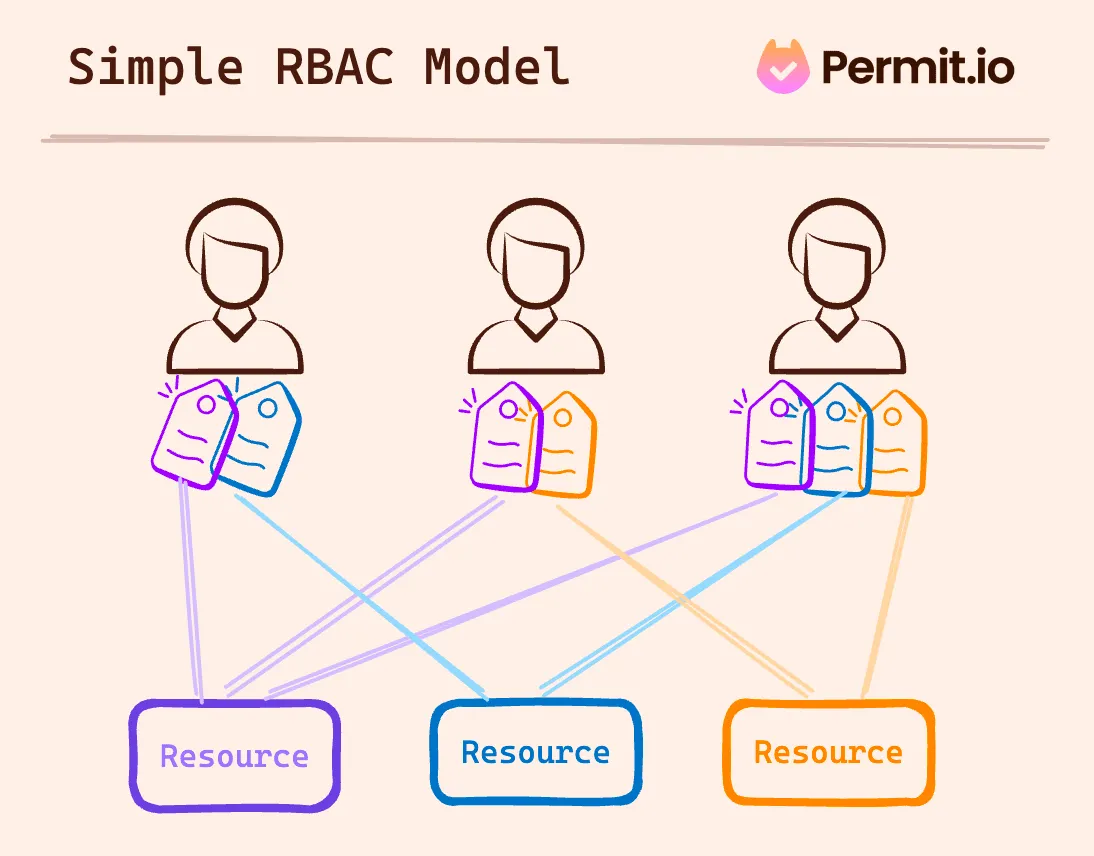
RBAC operates by assigning users roles that, in turn, have permissions attached to them.
These permissions dictate what actions a user can perform and what resources they can access. This approach streamlines the process of managing user rights, as it is no longer necessary to assign permissions on an individual basis.
Instead, managing access becomes a matter of assigning the appropriate role to a user's account. This structure not only simplifies the setup process but also enhances security by minimizing the risk of inappropriate access grants.
Examples of RBAC
To better understand RBAC, imagine a table of permissions corresponding to different roles within an application. For instance:
- Customer: Can view products and make purchases.
- Sales Manager: Can view and edit product listings, access sales reports, and manage customer orders.
- System Administrator: Has full access, including user management, system settings, and access to all data.
Here’s an example of such a table from Permit.io no-code RBAC UI 👇🏻
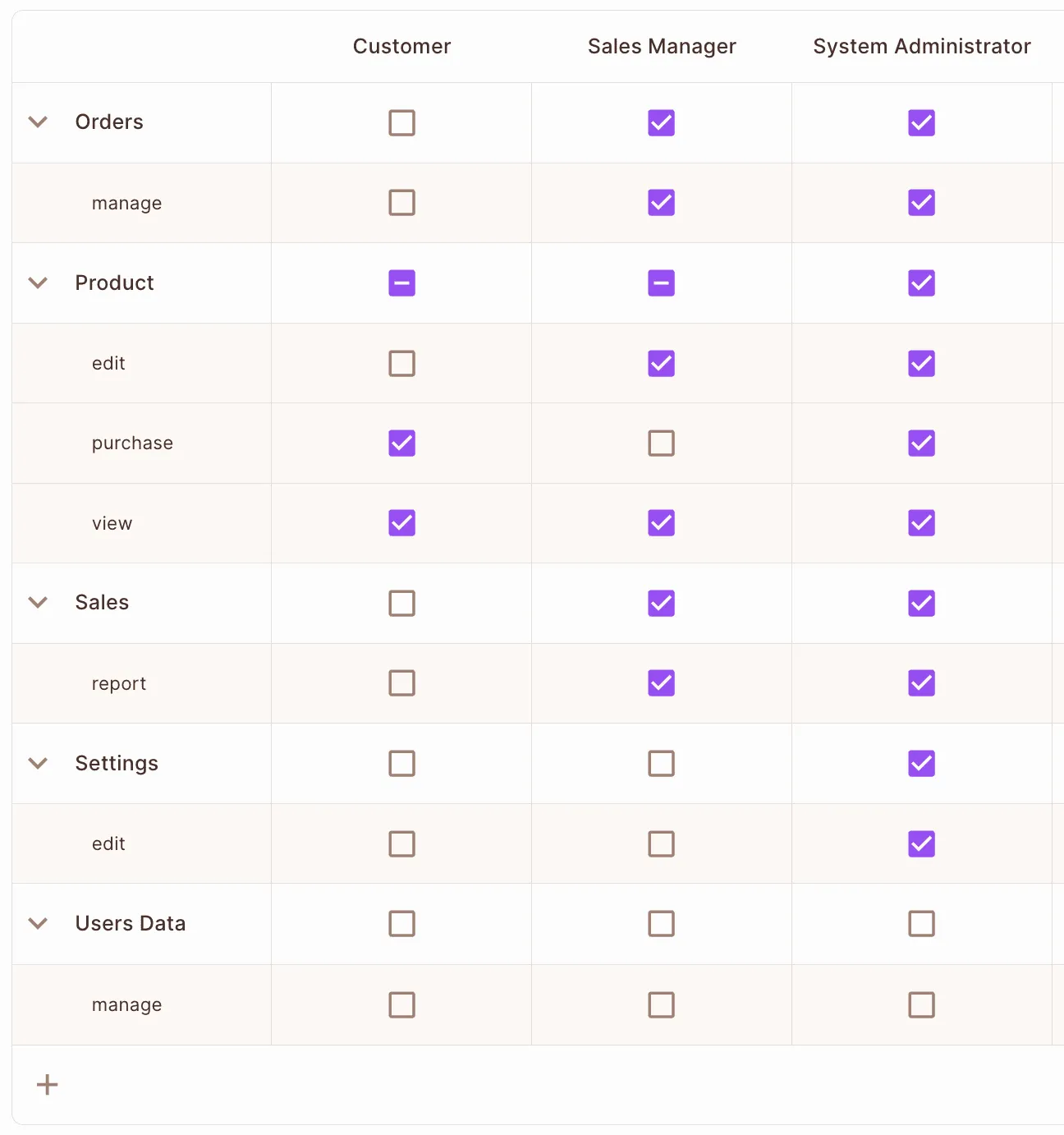
This delineation of roles and permissions exemplifies how RBAC structures access control in a clear, manageable fashion that contributes to both security and efficiency.
What are the benefits of RBAC?
The primary advantage of RBAC lies in its simplicity and efficiency. By categorizing users into roles and assigning permissions to these roles, RBAC creates a system that is easy to manage and audit. This streamlined process reduces the likelihood of errors in individual permission assignments. Here are the key benefits:
- Ease of Administration: RBAC minimizes the administrative burden. Adding a new user or changing a user's role is a straightforward process, requiring only the assignment of the appropriate role.
- Improved Security: By limiting access based on roles, RBAC ensures that users only have the permissions necessary for their job functions, reducing the risk of unauthorized access to sensitive information.
- Compliance and Auditability: RBAC aids in compliance with regulatory standards by providing a clear framework for who has access to what. It makes auditing user rights and roles more manageable.
- Scalability: RBAC scales well with the organization, as roles can be easily modified and extended to accommodate changing needs and new job functions.
- Reduced Complexity for Users: By having predefined roles, users are not overwhelmed with permissions irrelevant to their job functions.
However, RBAC is not without its challenges. Its simplicity can be a double-edged sword in complex scenarios requiring granular access control.
Limitations of RBAC
While advantageous in many scenarios, RBAC's simplicity can pose challenges in situations where fine-grained access control is required. Key challenges include:
- Limited Granularity: RBAC can sometimes be too coarse, especially in applications with vast data and services. It may not provide the level of detailed control required in complex environments. This can be mitigated by implementing more fine-grained authorization models - more on that in the next section.
- Role Explosion: In large organizations with diverse job functions, the number of roles can grow exponentially, making management cumbersome.
- Inflexibility in Dynamic Environments: RBAC can be less flexible in rapidly changing environments where user roles and permissions need frequent updates.
- Over-Privileging: There is a risk of users being granted more permissions than necessary for their role, leading to potential security risks.
RBAC Alternatives
While RBAC serves as a good base, alternative models offer better solutions in some scenarios.
Attribute-Based Access Control (ABAC) enhances granularity compared to RBAC by utilizing attributes (e.g., user location, time of access) in addition to roles. While this allows for more detailed access control, it complicates the audit process and requires more configuration effort. ABAC's dynamic nature can adapt to varied and complex scenarios but at the cost of increased system complexity and potential administrative overhead.
Relationship-Based Access Control (ReBAC) extends RBAC's capabilities by considering relationships between entities (e.g., manager-employee). Unlike RBAC, which is not inherently hierarchical and limits inspection to a single resource instance, ReBAC accommodates complex hierarchical structures and relationships. However, authoring and implementing performant decisions in ReBAC can be more complex compared to RBAC, making it suitable for advanced, relation-rich environments.
RBAC vs. PBAC
Policy-Based Access Control (PBAC) integrates well with RBAC, allowing policies to be configured as rules. This approach can be seen as an extension of RBAC, where access control decisions are based on policies that can encompass a variety of conditions and contexts. PBAC provides a framework for creating more dynamic and context-sensitive access control systems, aligning well with applications requiring adaptable and comprehensive access control strategies.
Best Practices for RBAC
Implementing RBAC effectively requires thoughtful planning and execution. Best practices include:
- Design a Scalable Authorization Service: Start with RBAC due to its simplicity, but ensure your authorization service architecture is flexible enough to incorporate more complex access control models in the future. This foresight allows for easier adaptation as your application evolves, accommodating more nuanced access control scenarios without necessitating a complete overhaul of the existing system.
- Regular Role Reviews: Conduct routine audits of role definitions and permissions. This practice ensures that roles remain relevant and secure as organizational structures and responsibilities evolve. Regular reviews help identify obsolete roles, the need for new roles, or adjustments in existing permissions, maintaining the integrity and effectiveness of your access control system.
- Principle of Least Privilege: Adhere strictly to granting the minimum level of access necessary for users to perform their job functions. This approach significantly reduces the risk of data breaches or unauthorized access, as users are limited in their actions and the data they can access.
- Use Tools Specialized Tools for Authorization: Leverage specialized tools to streamline the design and implementation of your RBAC system. Authorization-as-a-service providers such as Permit.io often come with intuitive interfaces, pre-built templates, and extensive customization options, making it easier to set up, manage, and scale your access control infrastructure as your application grows and your needs change.
Read more about RBAC Best Practices
An example of RBAC Policy Code in Cedar Language 👇🏻
permit(
    principal in Role::"admin",
    action in [
        Action::"task:update",
        Action::"task:retrieve",
        Action::"task:list"
    ],
    resource in ResourceType::"task"
);
What Next?
While RBAC stands as a fundamental model in application authorization, understanding its limitations and alternatives is crucial for developers aiming to build secure, efficient, and compliant systems. By wisely applying RBAC and its alternatives, you can ensure your applications remain secure, adaptable, and aligned with evolving business requirements.
RBAC is a great authorization solution due to its simplicity and effectiveness, but you should also consider hybrid approaches for more complex scenarios. For a robust and streamlined RBAC implementation, Authorization-as-a-service providers like Permit.io can provide an excellent starting point, offering ease of use and scalability to meet diverse application needs.
Frequently Asked Questions
What is RBAC in simple terms?
RBAC (Role-Based Access Control) assigns permissions to roles, then assigns roles to users. If you hold the Editor role, you get all permissions the Editor role grants. When you change jobs, an admin changes your role instead of updating dozens of individual permissions.
What is an example of role-based access control?
A content management system might define three roles: Viewer (can read articles), Editor (can read and edit articles), and Admin (can read, edit, delete articles and manage users). A new hire joining the content team is assigned the Editor role and immediately has the right permissions.
What is the difference between RBAC and ABAC?
RBAC grants access based on role assignment. ABAC grants access based on attributes evaluated at decision time, such as user department, resource classification, time of day, or location. RBAC is simpler; ABAC is more flexible when context matters. Many systems combine both.
What is the difference between RBAC and ReBAC?
RBAC assigns roles at the tenant or system level. ReBAC stores relationships between users and specific resource instances (like "Alice is the owner of this document"). ReBAC handles hierarchies and ownership without creating a role for every resource.
When should I use RBAC?
Use RBAC when your permissions map to stable job functions and you do not need per-resource ownership or context-aware rules. RBAC is a good starting point for most applications. You can add ABAC or ReBAC later when you hit limits.
How do I implement RBAC in my application?
Define the roles your application needs and which permissions each role grants. Store role assignments (user to role mappings). At each enforcement point, check whether the current user holds a role that grants the required permission. Services like Permit.io handle the policy storage and check logic so you only need to call an API.
Want to learn more about authorization? Join our Slack community, where developers discuss, build, and implement access control.
Further Reading
More RBAC-Related Resources are available here: