In many applications, authorization is typically seen as an allow-or-deny mechanism. However, determining user access is more nuanced than a simple binary decision.
Users often need permission to view only a subset of data—without necessarily gaining full access or being completely blocked.
Managing database permissions is essential for controlling access to sensitive information. This blog explores how effective permission strategies—specifically, data filtering—can secure databases while ensuring optimal performance.
With Data filtering, the actual data returned to each user is narrowed based on their authorization level.
When applied appropriately, it enhances security, reduces the risk of data leaks, and prevents users from being overwhelmed by unnecessary information. It also scales well, helping large datasets remain manageable by filtering out irrelevant results before they reach the user.
What This Article Covers
This article explains:
- What are Database Permissions, and why do they matter?
- The Foundations of Data Filtering and why it matters for database permissions
- Different approaches to filtering data (application-level, PDP-level, source-level, etc.)
- Examples of implementing these approaches using a Policy Decision Point (PDP), with real-life context from our transcript
- Practical code snippets that illustrate how Permit can handle bulk checks, partial evaluations, and user permission queries
- Performance and deployment considerations—highlighting insights like caching, load balancing, and sharding for massive datasets
- General best practices for maintaining secure, flexible, and efficient data filtering in modern applications
By the end, you’ll see how structured authorization policies and data filtering can keep data under control and secure, whether you’re working with tens or millions of records.
What Are Database Permissions and Why Do They Matter?
Database permissions are rules that control how users and applications interact with a database. These permissions define who can perform specific actions—such as reading, writing, updating, or deleting data—and are critical for maintaining security, integrity, and proper access to sensitive information.
The Need for Efficient Filtering
One of the most common topics in software development discussions is dealing with scale. As datasets grow—sometimes into the millions—performing thousands of brute-force permission checks can slow down performance.
Applying a simplistic allow/deny framework in these cases can lead to major inefficiencies—like pulling all data only to discard most of it later. Instead, filtering closer to the data source or applying policies more strategically can shrink response times, reduce bandwidth usage, and lower the risk of unnecessary data exposure.
Another good solution to handle this complexity is to divide data into smaller chunks based on attributes.
Imagine a design database that stores concepts planned for years ahead, along with items already in production. With data filtering, you can ensure that users only see what they’re authorized to see, even if a query nominally spans all records. This approach is especially valuable in database permissions, where filtering data at or near the source provides a more secure and efficient solution than discarding unwanted rows later in the application layer.
Here’s a simple snippet demonstrating a basic check in Permit (Node.js):
const { Permit } = require("permitio");

const permit = new Permit({ token: "<YOUR_API_KEY>" });

// Checking if a user can read a "document"
const allowed = await permit.check({
  user:   "john@doe.com",
  action: "read",
  resource: "document:doc-123"
});

if (allowed) {
  console.log("User is permitted to read this document.");
} else {
  console.log("User is not permitted to read this document.");
}
This allow-or-deny approach is often the first step. To enable data filtering—especially at scale—you can incorporate methods like bulk checks or partial evaluations to ensure only relevant rows are returned in the first place, which we’ll explore next.
In many applications, permissions are defined by a role-based model (“admin,” “editor,” “viewer”) or by attributes such as the user’s department or the resource’s confidentiality level. The relationships between entities—like a manager overseeing a specific team—might also come into play. Regardless of the specific model (RBAC, ABAC, or ReBAC), data filtering builds on these rules to hide or reveal records and fields based on each user’s precise level of access.
Whether the underlying logic occurs in the database, a specialized service, or the application itself, the end goal remains the same: ensuring users only see the data they have permission to see. But how should this filtering be applied?
Four Approaches to Data Filtering
Data filtering can occur at different points in the data retrieval process. Some methods fetch all records first (and then reduce them), while others trim the dataset before it ever leaves the database. Below are four common strategies, along with notes on when the filtering actually happens.
1. Application-Level Filtering
In this approach, the application retrieves all potential data from the database and then applies bulk authorization checks through the PDP to decide which items the user can see. It’s relatively straightforward to implement, though it can become inefficient as the dataset grows.
- When Filtering Happens: After the data has been fetched from the database.
- Pros: Simple to utilize with existing
check code; no need to alter queries.
- Cons: Large fetches waste bandwidth and processing time if many items are filtered out.
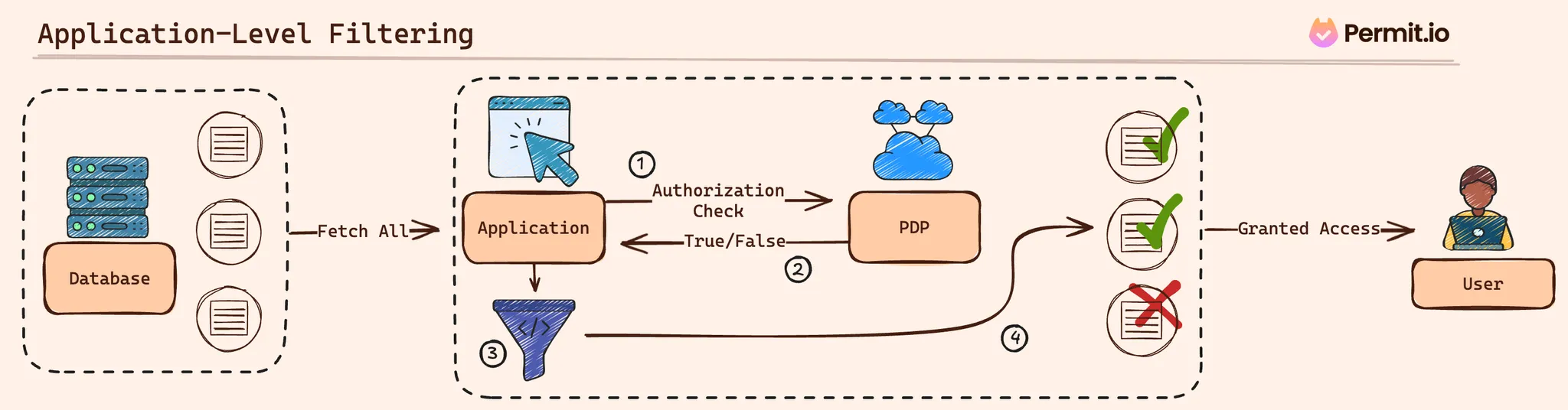
Example: Application-level filtering with a Bulk Check
Below, the application gathers documents and then runs multiple checks in one call to reduce overhead. The filtering still happens after fetching from the DB:
// Suppose you've already fetched 'documents' from the database:
const documents = [
  { id: "doc-1", title: "Draft Plan", confidential: true },
  { id: "doc-2", title: "Public Note", confidential: false },
  // ... possibly many more
];

// Build the check requests for each item
const checkRequests = documents.map(doc => ({
  user:   "alice@example.com",
  action: "read",
  resource: `document:${doc.id}`
}));

// Perform a single bulk check for all items
const permittedResults = await permit.bulkCheck(checkRequests);

// Filter based on the results
const permittedDocs =

console.log("Documents Alice can see:", permittedDocs);
In this scenario, all documents were already fetched, but the application at least saves time on authorization by batching the checks.
2. PDP-Level Filtering
With PDP-level filtering, the application still collects potential data from the database, but instead of iterating through each item and making check calls, it hands the entire dataset to a Policy Decision Point (PDP). The PDP then returns only the items the user can view.
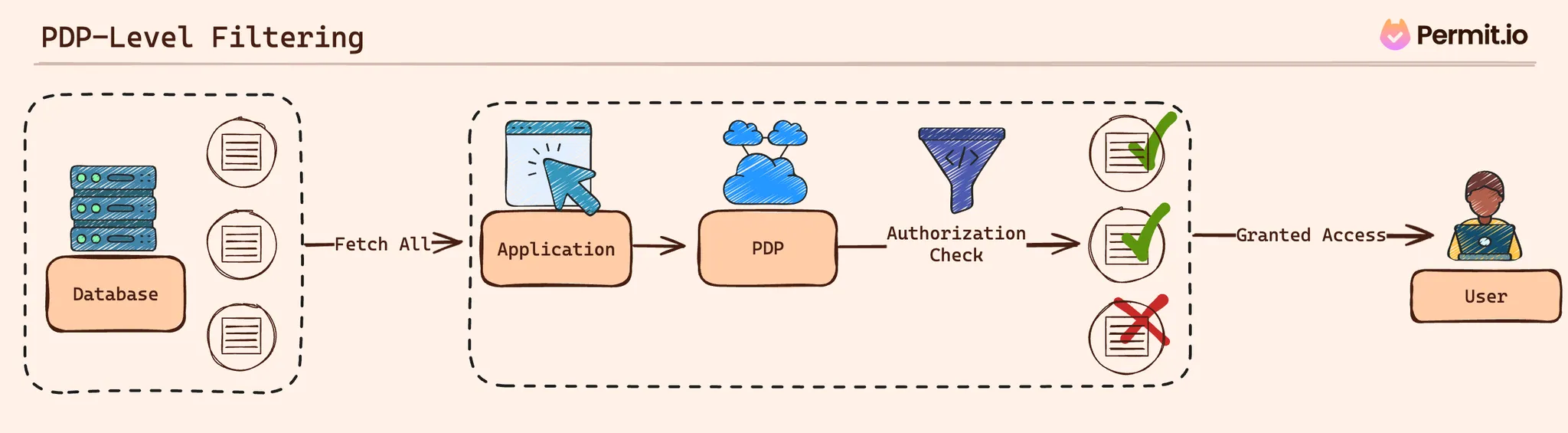
- When Filtering Happens: Also after the fetch, but the PDP is responsible for filtering.
- Pros: Centralizes authorization logic in a dedicated service.
- Cons: If many items exist, passing them to the PDP can be expensive.
Example: Filtering a Batch of Resources at the PDP (Go)
go
Copy code
resourcesToCheck := []enforcement.ResourceI{
    enforcement.ResourceBuilder("document").WithID("doc-1").Build(),
    enforcement.ResourceBuilder("document").WithID("doc-2").Build(),
    // ...
}

// Filter the objects at the PDP
allowedResources, err := permit.FilterObjects(
    enforcement.UserBuilder("alice@example.com").Build(),
    "read",
    nil, // context (additional parameters)
    resourcesToCheck...,
)

if err != nil {
    fmt.Println("Error filtering objects:", err)
} else {
    // 'allowedResources' only includes items Alice can access
    fmt.Println("Documents Alice can see:", allowedResources)
}
Although the PDP manages filtering logic, the application still pulls a wide range of items before evaluating them.
3. PDP-Level Filtering with an Information Graph
Instead of retrieving data first and then filtering, the application queries the PDP to see which resources a user can access. With that list, it fetches only the permitted resources from the database.
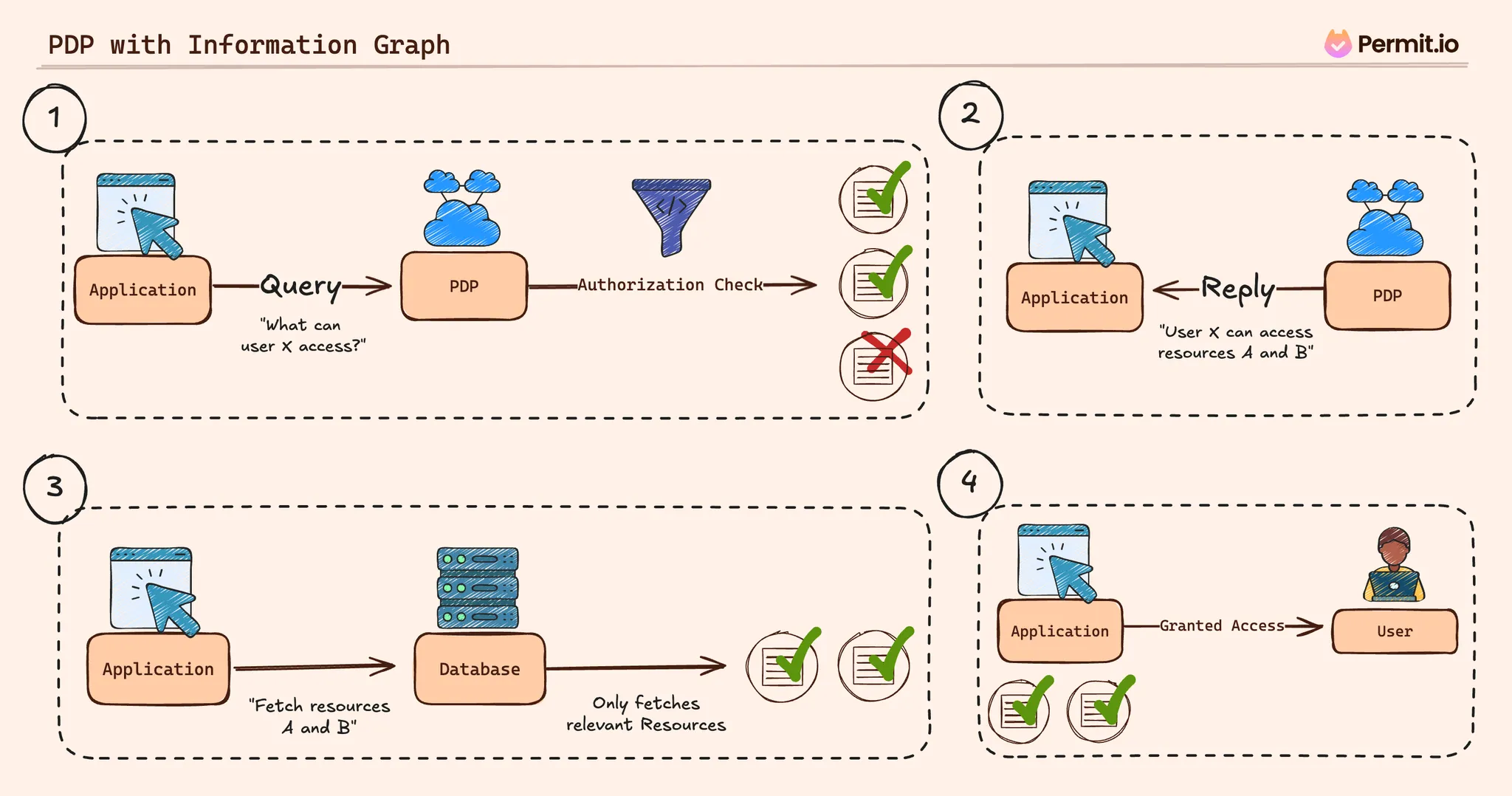
- When Filtering Happens: Before running the main database query, the application first learns what resources are allowed.
- Pros: Reduces unnecessary data retrieval by narrowing the query scope upfront.
- Cons: Requires more sync and a robust mapping between the PDP’s resource graph and actual DB records.
Example: Discovering Permitted Resources, Then Fetching Them (Node.js)
// Ask the PDP which 'documents' Alice can read (across tenants, or just one)
const userPermissions = await permit.getUserPermissions("alice@example.com", [], [], ["document"]);

// Extract the allowed document IDs
const allowedDocIDs = userPermissions
  .filter(entry => entry.resourceType === "document")
  .map(entry => entry.resourceKey);

// Fetch only permitted documents from the DB
const permittedDocs = await db.Document.find({ id: { $in: allowedDocIDs } });

console.log("Documents Alice can see:", permittedDocs);
Here, you identify the subset of authorized documents in advance. This method is effective for large datasets because it avoids fetching irrelevant rows in the first place.
4. Source-level filtering with Partial Evaluation
Partial evaluation goes a step further by embedding authorization logic directly into the database query. The PDP can compile policy rules into a conditional expression—like a WHERE clause—so the database itself returns only matching rows.

- When Filtering Happens: During the database query, as part of the query’s own logic.
- Pros: Limits data transfer, as the DB never returns disallowed records.
- Cons: More complex setup. Requires careful maintenance of policy-to-query mapping.
Conceptual Example: OPA / Rego Policy and Compiled Query
Here’s a simple Rego example:
package example

# Default deny
default allow = false

# Allow if user and resource share the same department
# and the resource's launch_date is within the next 180 days
allow {
  input.user.department == input.resource.department
  input.resource.launch_date <= now() + 180
}
Through partial evaluation, this policy might compile to a SQL clause:
WHERE department = 'Design'
AND launch_date <= CURRENT_DATE + INTERVAL '180 days'
Your application then appends or replaces the query logic to retrieve only permissible rows:
SELECT * FROM product_designs
  WHERE department = 'Design'
  AND launch_date <= CURRENT_DATE + INTERVAL '180 days';
When integrated with a PDP, this can happen automatically or via custom code. Some tools, including Permit, fully support partial evaluation via OPA’s AST (Abstract Syntax Tree) functions, leveraging OPA’s native capability for AST compilation during partial evaluation. Additionally, Permit offers early access support for Postgres partial evaluation, enabling policy rules to be directly converted into SQL queries without requiring manual Rego or policy compilation.
Each approach offers unique advantages. Application-level filtering is the easiest to set up but scales poorly. PDP-level methods unite authorization logic in one place. An information-graph approach helps you pre-empt unwanted queries. Finally, partial evaluation focuses on never retrieving unneeded data in the first place, which can be a game-changer on a large scale.
Practical Considerations
Once you’ve chosen a data filtering approach, it’s important to address some real-world challenges. Issues around scale, performance trade-offs, time-based conditions, and policy flexibility often surface as data and business requirements grow. Below are a few points to keep in mind:
Scaling
When an application contains tens of thousands—or even millions—of records, pulling all of them into the application layer or a PDP can become cumbersome. Here are some strategies for managing large datasets:
- Grouping Resources: Consider grouping related items by attributes such as time frames, departments, or categories. Rather than handling massive lists of unique IDs, you can pass a single shared group identifier to a PDP or database filter.
- Filtering at the Source: For very large volumes of data, partial evaluation can prevent a flood of irrelevant rows. By embedding policy logic directly in the query, you ensure only permissible rows leave the database.
Performance vs. Simplicity
Some filtering methods are more straightforward to implement but less efficient at scale. Others require more setup effort but yield better performance in the long run. Balancing these factors often depends on:
- Immediate Needs: If the dataset is small or time to market is critical, application-level or PDP-level filtering might suffice.
- Future Growth: If you anticipate rapid expansion, it might be prudent to invest in advanced techniques like information-graph filtering or partial evaluation early on.
Time-Based or Attribute-Driven Constraints
Access often depends on more than just roles. For instance, users may see items only if their launch date is within six months or if they belong to a specific department. In these scenarios, data filtering is best supported by:
- Dynamic Conditions: Policies that evaluate attributes such as dates or classifications, granting or withholding access automatically as these attributes change.
- Preprocessed Attributes: Where feasible, store or calculate grouping attributes (for example, “launch_window”) in the PDP, so queries can efficiently zero in on what each user is allowed to see.
Maintaining Policy Flexibility
Over time, authorization requirements evolve. Adapting to new rules or removing outdated ones shouldn’t require a complete overhaul of the database schema. Here are a few ways to keep your system flexible:
- Decoupled Policy Logic: Store and manage policies in a dedicated service or module (e.g., a Git repository) so the database schema remains stable.
- Incremental Transitions: It’s common to start with PDP-level filtering and move gradually toward partial evaluation as the application’s data load or complexity increases.
By preparing for these considerations—scaling up, balancing performance, handling attributes intelligently, and maintaining adaptability—you can build a data filtering strategy that remains both efficient and secure as the application evolves.
Best Practices for Database Permissions
Building effective data filtering involves more than just choosing a technical approach. It also requires a set of overarching guidelines that keep policies manageable and ensure they scale smoothly. The following practices can help you maintain a secure, efficient, and flexible authorization layer—whether you’re dealing with a handful of records or millions.
Apply Least Privilege
A foundational practice is to grant each user or service only the minimum data they truly need. By using a least privilege approach, you prevent accidental overexposure of sensitive information. If a user should only see certain rows, make it explicit in your policy definitions so that data outside their scope never becomes visible.
Deploy Authorization Logic Close to Your Services
Placing a small authorization service or PDP container near each microservice—often called a sidecar pattern—can help minimize latency. When each service has direct access to its own policy decision logic, you reduce round trips across the network. In high-traffic scenarios, you might scale horizontally by running multiple PDP instances behind a load balancer, ensuring one node doesn’t handle all requests.
Instrument for Observability
Comprehensive observability allows you to detect performance issues or authorization errors early. By logging PDP checks and database queries, you can spot if certain rules or data sets are causing slowdowns. This insight makes it easier to decide whether you need more hardware resources, refined indexing strategies, or advanced techniques like partial evaluation. Observability also aids troubleshooting by pinpointing exactly where and why checks fail.
Leverage Partial Evaluation
Instead of filtering out disallowed data after it’s retrieved, partial evaluation embeds policy logic directly into your database queries. This prevents unwanted rows from ever leaving the server. Some policy engines compile high-level rules (e.g., a Rego policy specifying “launch_date must be within the next 30 days”) into a structured query. Storing these generated queries in version control makes iterative updates simpler as your application’s data model evolves.
Handle Time-Based Constraints Dynamically
Applications often have content or features scheduled to unlock at a specific time. Rather than manually toggling permissions, assign an attribute (like “launch_window”) and let the policy engine compare it against the current date. When that date arrives, authorized users automatically gain access—no additional code needed. This approach keeps time-based logic centralized, avoids inconsistencies, and works alongside other filtering criteria (like roles or user attributes).
When combined, these practices—least privilege, local PDP deployments, in-depth observability, partial evaluation, and dynamic time-based checks—form a solid framework for managing database authorization. By designing your system around these principles, you ensure it can scale effectively while continuing to protect sensitive data as requirements evolve.
Conclusion
Data filtering goes beyond the basic yes-or-no paradigm of authorization, allowing you to determine precisely which records each user can see. By carefully selecting your filtering strategy—whether at the application level, within a dedicated Policy Decision Point, or as part of a source-level approach—you should be able to strike a balance between simplicity and efficiency.
Planning ahead for larger datasets is a key part of this process. As your data volume grows, approaches that seemed straightforward initially might strain both application and database performance. Techniques like partial evaluation can help by shifting filtering logic to the database layer so irrelevant data never even leaves the server. Meanwhile, dynamic policies—especially those driven by attributes like launch dates—ensure that access changes automatically when real-world conditions shift.
A well-rounded solution includes clear policy definitions, observability for monitoring performance, and least-privilege principles to keep sensitive data under control. By embracing these practices, you’ll build a scalable, maintainable authorization layer.
If you’d like to explore a specialized service that supports these methods, you can try Permit for free. It provides advanced policy checks, partial evaluation features, and attribute-based rules, helping you manage data filtering and authorization without heavy overhead or extensive custom code.