If you’re building an application that handles sensitive data across multiple organizations, there’s no doubt you’ll have to implement proper access control. A multi-tenant system needs to ensure that users from one organization cannot access another organization's data while also managing different permission levels within the same company. Express.js, while great for building APIs, does not provide a built-in way to handle these authorization needs. Developers often end up implementing access checks manually, leading to scattered and difficult-to-maintain permission logic.
Consider a document management system where companies store confidential documents—technical specifications, financial reports, and strategic plans. We want to ensure only authorized employees can view, edit, or manage documents while preventing unauthorized access. Without a structured authorization model, enforcing these rules is close to impossible.
This is where Role-Based Access Control (RBAC) comes in. RBAC helps define clear roles—such as admin, editor, and viewer—each with specific permissions. Instead of manually checking permissions at every endpoint, we can use a structured approach to keep access control clean and manageable.
In this guide, we'll walk through implementing RBAC in an Express.js application. We'll use Permit.io to help with permission management and enforcing multi-tenant authorization. By the end of this guide, you'll have a system where different organizations can securely manage their documents with clearly defined access controls and auditing capabilities.
What This Guide Will Cover:
- Understanding RBAC fundamentals for document management
- Building basic Express.js authorization and seeing its limitations
- Implementing proper tenant isolation with RBAC
- Configuring role-based permissions in Permit.io
- Comprehensive audit logging for document access
Before we get into our guide, let’s take a closer look at the problems with custom-built authorization and why a structured RBAC approach is necessary.
The Custom-Built Authorization Problem
Many developers start with simple access checks when building authorization into their applications. At first, this seems manageable, but as the system grows, permission logic quickly becomes a tangled mess. Let’s see how this usually evolves:
Consider a basic example where we check whether a user can access documents:
app.get('/documents', (req, res) => {
  if (!req.user.canAccessDocuments) {
    return res.status(403).send('Access denied');
  }
  // Handle document retrieval...
});
As organizations need more granular controls, we add role checks:
app.get('/documents', (req, res) => {
  if (!req.user.isAdmin && !req.user.isEditor) {
    return res.status(403).send('Access denied');
  }
  // Handle document retrieval...
});
Then we need to verify document ownership and tenant isolation:
app.get('/documents/:id', (req, res) => {
  if (!req.user.isAdmin &&
      !req.user.isEditor &&
      req.user.id !== doc.ownerId &&
      req.user.tenantId !== doc.tenantId) {
    return res.status(403).send('Access denied');
  }
  // Handle document retrieval...
});
At this point, authorization logic is spread across multiple endpoints, this makes it:
- Difficult to maintain – Changes to access rules require updates in multiple places.
- Prone to security risks – A missing check can expose sensitive data.
- Hard to audit – It’s unclear who has access to what and when permissions change.
- Rigid and inflexible – Modifying permissions often requires direct changes to the code.
This approach doesn’t scale well, especially in a multi-tenant system where different organizations need strict isolation of their data. Instead of managing access rules through scattered conditions, a more structured solution—RBAC—allows for a clean separation between application logic and authorization.
Let’s look at two key principles that can help us build a more maintainable system:
- Design your permissions model independently from implementation. Instead of adding document access checks as needs arise, first model the complete permission structure needed by tenants - defining clear roles, resources, and actions.
- Separate authorization logic from your application code. Rather than embedding permission checks throughout your document endpoints, use Permit.io to handle role verification and access control, keeping your Express.js routes focused on document management logic.
This foundation will help us build a document management system that’s both secure and maintainable.
Demo Application: A Document Management System
To demonstrate how RBAC works in a real-world scenario, we'll build a multi-tenant document management system. This system will allow organizations like TechCorp and FinanceHub to manage their confidential documents while enforcing strict access controls based on user roles.
Our application will include:
- Defined Roles – Admin, Editor, and Viewer, each with specific permissions.
- Resource Access – Documents will be protected, ensuring only authorized users can access them.
- Permission Hierarchy – Admins have full control, Editors can modify content, and Viewers can only read.
- Multi-Tenant Security – Users can only access documents within their own organization.
- Audit Logs – All access and modifications will be logged for accountability.
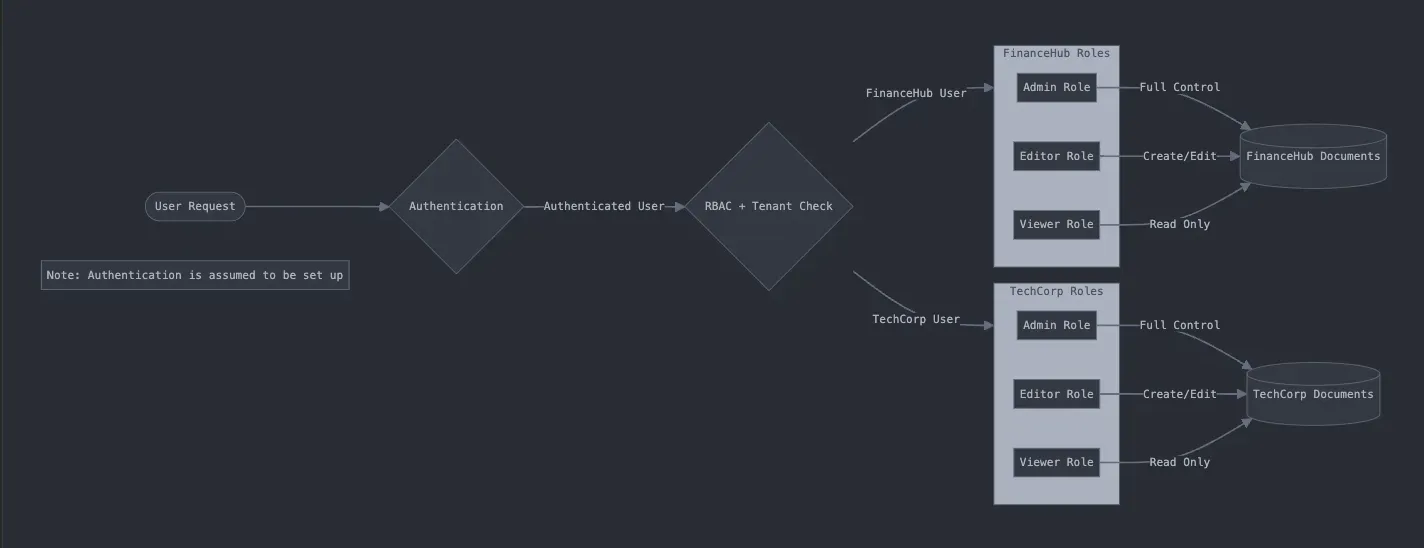
The diagram above illustrates our RBAC implementation flow. After authentication (assumed to be handled), the system evaluates the user’s role within their organization:
- Admins have full control over their organization’s documents
- Editors can create and modify documents within their organization
- Viewers can only read documents from their organization
This clear separation of roles and tenant isolation shows RBAC’s power in creating secure, manageable document access control.
Designing the Permission Model
When implementing permissions in our multi-tenant document system, we consider three key components:
- Identity and Role: Who is the user and which organization do they belong to?
- Resources: Which tenant’s documents are they trying to access?
- Actions: What operations are they attempting to perform?
Each user in an organization will have a predefined role that determines their level of access:
| Role |
Resource |
Actions |
| Admin |
Tenant’s Documents |
Create, Read, Update, Delete |
| Editor |
Tenant’s Documents |
Create, Read, Update |
| Viewer |
Tenant’s Documents |
Read |
We can translate these requirements into specific conditions:
Translating to Specific Conditions
Roles
- Admins have full control over their organization’s documents
- Editors can create, view, and modify their organization’s documents
- Viewers can only read their organization’s documents
Resources
- Documents (with tenant isolation)
- Document metadata (title, content, timestamps)
- Audit logs (for tracking access)
Actions
- Create: Adding new documents within the tenant
- Read: Viewing tenant’s documents
- Update: Modifying existing documents
- Delete: Removing documents from the tenant
Each permission check enforces both role-based access and tenant isolation, ensuring users can only perform allowed actions on documents within their organization.
Basic Express.js Implementation
Let’s start with a simple approach to handling multi-tenant document access in Express.js.
Setting Up Basic Authorization
Below is a middleware function that checks whether a user has the necessary permissions for a given action:
const express = require('express');
const app = express();

// Our initial permission middleware
const checkPermission = (action) => {
  return (req, res, next) => {
    const user = req.user; // Assuming authentication is set up
    const userRole = user.role;
    const userTenant = user.tenantId;

    // Basic permission map per role
    const permissionMap = {
      admin: ['create', 'read', 'update', 'delete'],
      editor: ['create', 'read', 'update'],
      viewer: ['read']
    };

    // Check both role permission and tenant match
    if (permissionMap[userRole]?.includes(action)) {
      // Verify tenant access
      if (req.params.documentId) {
        const document = documents.find(d => d.id === req.params.documentId);
        if (document && document.tenantId !== userTenant) {
          return res.status(403).send('Access denied: Wrong tenant');
        }
      }
      next();
    } else {
      res.status(403).send('Permission denied');
    }
  };
};

// Document routes with permission checks
app.get('/documents', checkPermission('read'), (req, res) => {
  const userDocs = documents.filter(doc => doc.tenantId === req.user.tenantId);
  res.json(userDocs);
});

app.post('/documents', checkPermission('create'), (req, res) => {
  const newDoc = {
    id: Date.now(),
    ...req.body,
    tenantId: req.user.tenantId,
    createdBy: req.user.id
  };
  documents.push(newDoc);
  res.status(201).json(newDoc);
});

app.put('/documents/:id', checkPermission('update'), (req, res) => {
  // Add tenant verification and update logic
});

app.delete('/documents/:id', checkPermission('delete'), (req, res) => {
  // Add tenant verification and deletion logic
});
While this works for basic cases, it has critical limitations:
- Tenant isolation is not fully enforced – It relies on manual checks.
- Role checks become difficult to maintain – Adding new roles requires updating multiple places in the code.
- No audit logs – There is no way to track who accessed or modified documents.
- Hard to update permissions – Changes require modifying the code instead of a centralized policy system.
As applications scale, these issues make manual authorization impractical. Instead of handling permissions within the application code, we need a structured approach that separates authorization logic from business logic.
Next, we’ll enhance this system by implementing RBAC with Permit.io to manage roles and permissions more efficiently.
Implementing RBAC with Permit.io
Managing document access across multiple organizations requires more than just hardcoded role checks. Our basic Express.js implementation highlighted key challenges, including scattered permissions logic, lack of tenant isolation guarantees, and difficulty in managing access control at scale.
To solve these issues, we’ll integrate Permit.io, which provides a structured approach to RBAC while keeping our Express.js code clean and maintainable.
What We’re Building
Our enhanced document management system will include:
- Isolated document access – Each organization has its own private document space.
- Role-based permissions – Admins, Editors, and Viewers have clearly defined actions.
- Strict tenant boundaries – Users cannot access documents outside their organization.
- Centralized authorization management – Instead of embedding permissions in code, we’ll use Permit.io to enforce access rules.
How We’ll Implement RBAC
Rather than manually checking permissions within route handlers, we’ll:
- Define roles and permissions in Permit.io – Configure Admin, Editor, and Viewer roles along with their allowed actions.
- Set up tenant isolation – Ensure users can only access documents within their own organization.
- Integrate Permit.io with Express.js – Offload permission checks to Permit.io, keeping our application code focused on business logic.
Here’s how our streamlined code will look:
app.post('/documents', permitMiddleware, async (req, res) => {
  const { title, content } = req.body;
  const tenantId = req.user.tenantId;

  // No manual permission checks needed!
  // permitMiddleware already verified if the user can create documents

  const document = await Document.create({
    title,
    content,
    tenantId,
    createdBy: req.user.id
  });

  res.json({ success: true, document });
});
Let’s start by setting up our permission model in Permit’s dashboard. This is where we’ll define our tenants, roles, and their relationships – all without writing a single line of code.
Configuring Permissions in Permit
Setting Up Document Resource
Now that our model is designed, it’s time to put it into action! To maintain a clean structure, we’ll configure our permissions in Permit’s dashboard, separating policy management from our application logic. This approach lets us focus on our document management features while Permit handles the complex permission checks.
Creating Our Documents Resource
First, log in to your Permit dashboard here, navigate to the Policy tab in the Permit dashboard, and select the Resources section. Here, we’ll define what actions users can perform on documents:
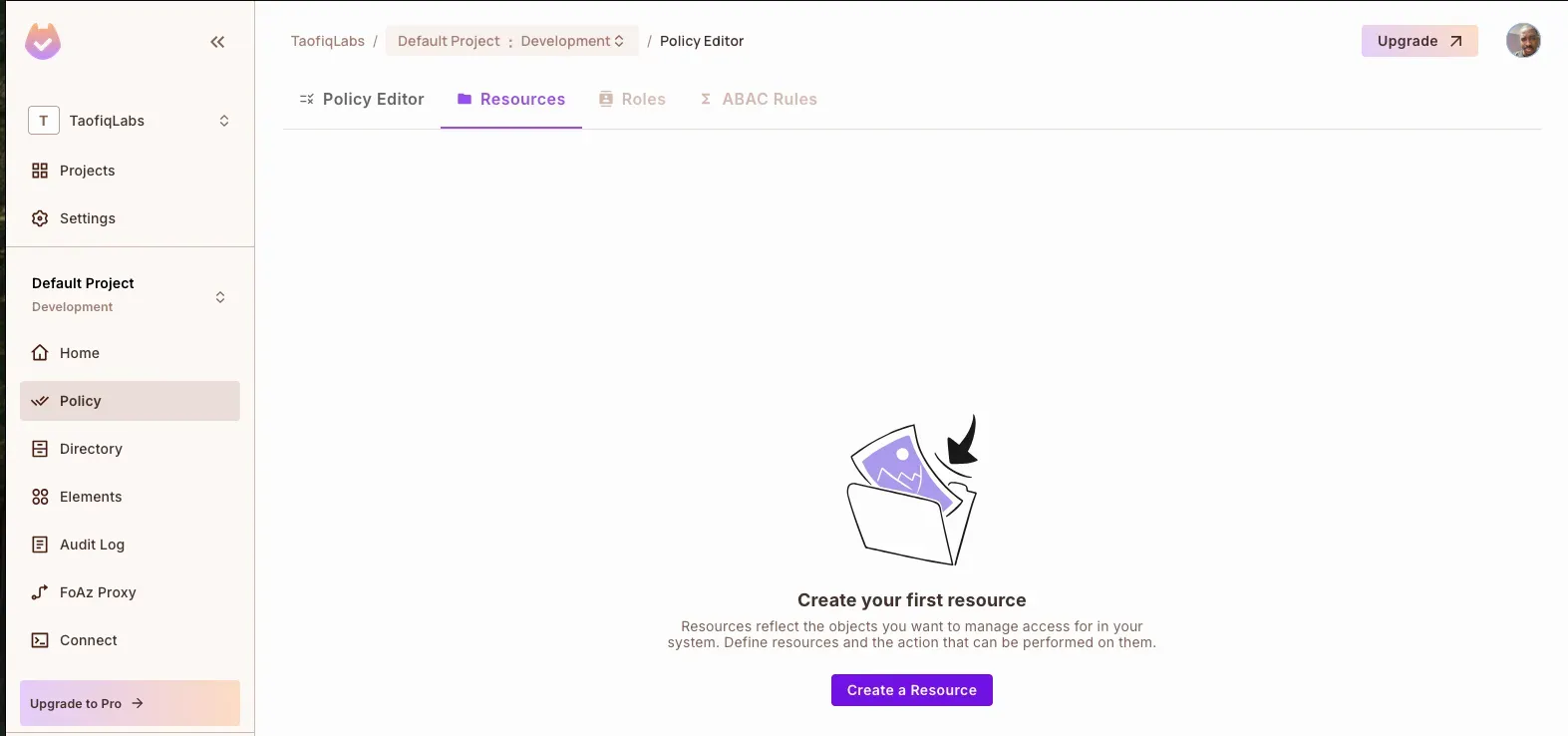
- Click the “Create Resource” button
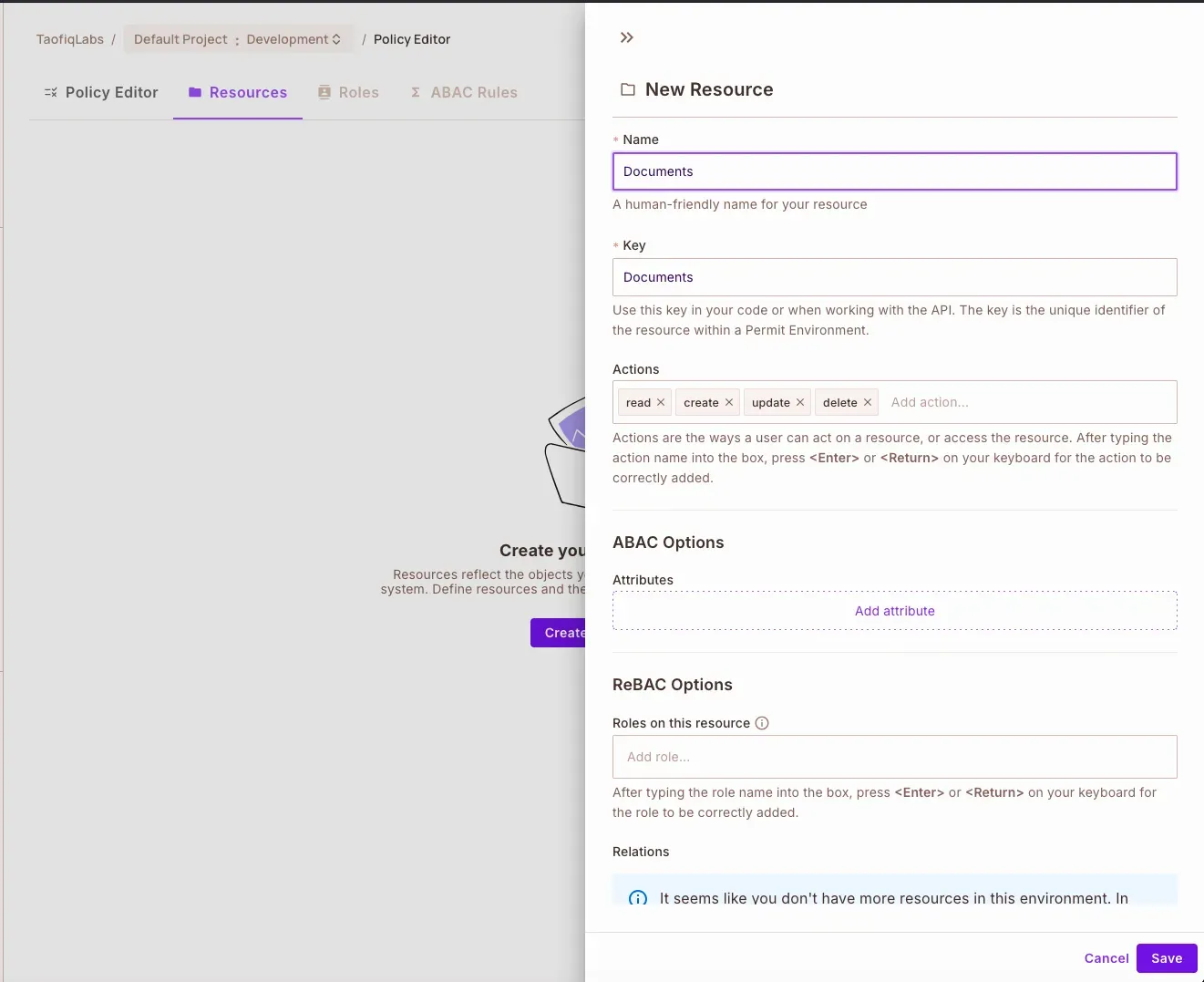
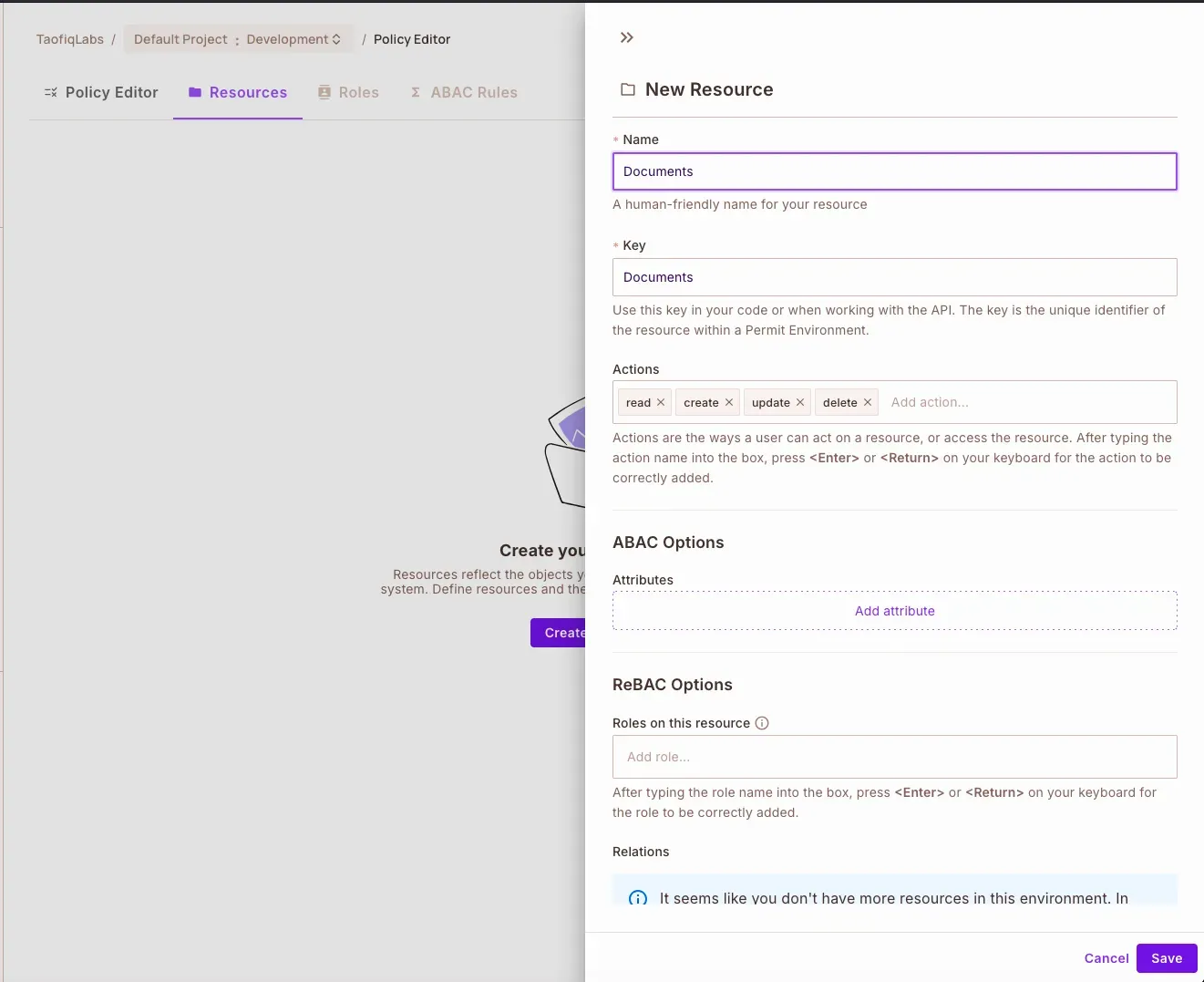
- Configure the Documents resource:
name: Documents
Key: documents
Actions:
- create
- read
- update
- delete
3. Click on Save button to save the Documents resource.
Setting Up Roles and Their Permissions
While still in the Policy tab, we’ll create our three roles. Each role gets specific permissions aligned with their responsibilities:
- Navigate to the Roles section
- Click on the
Add Role button to create each role and assign permissions:
For the Admin role:
Name: Admin
key: admin
Permissions: Full access (create, read, update, delete)
For the Editor role:
Name: Editor
key: editor
Permissions: create, read, update
For the Viewer role:
Name: Viewer
key: viewer
Permissions: read only
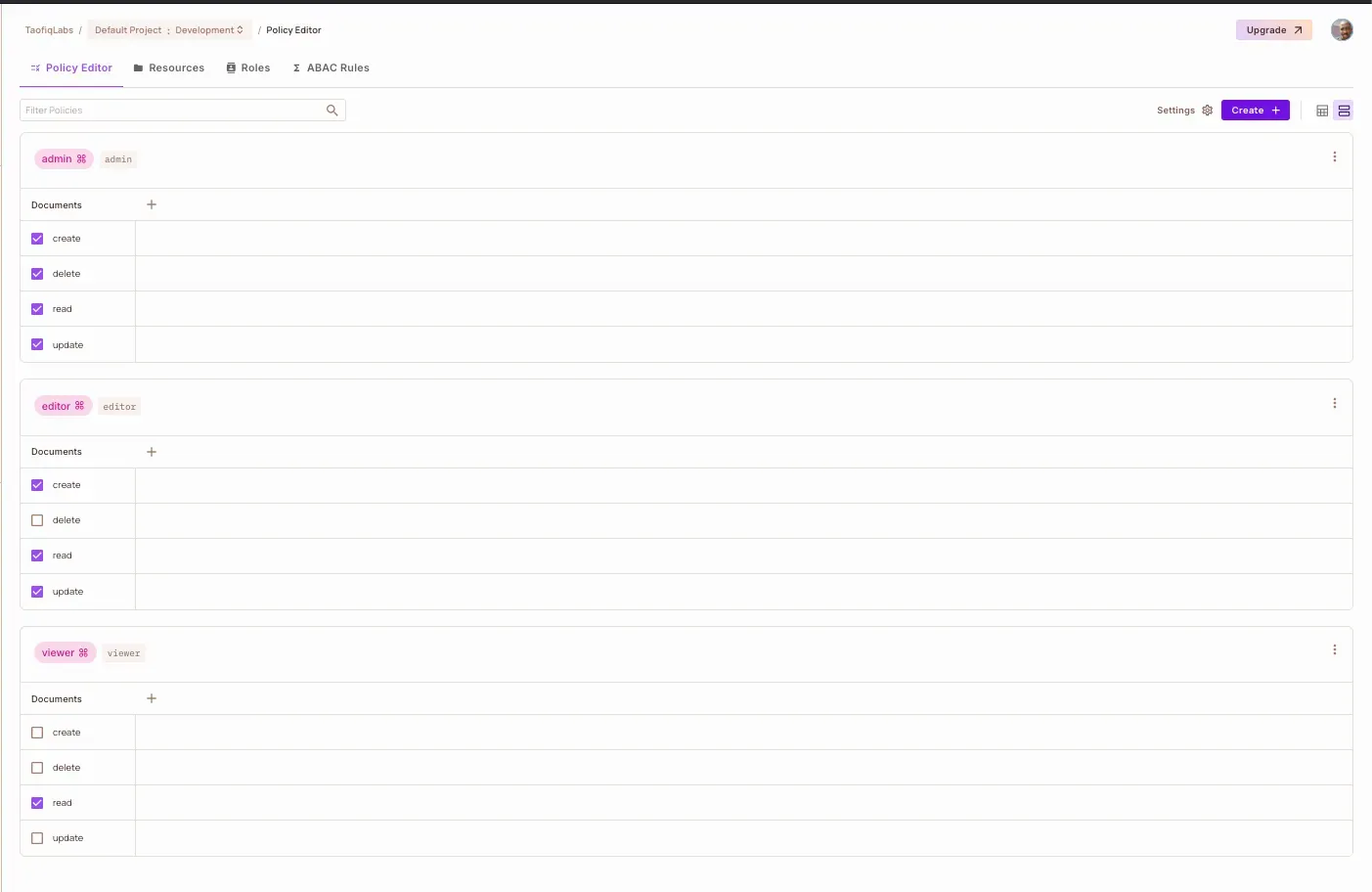
In the Policy editor tab, customize the policy table based on the conditions we have set for each role:
Creating Our Tenants
Switch to the Directory tab to set up our tenants and their users:
TechCorp Setup:
Click on “All Tenant” dropdown and click Create New
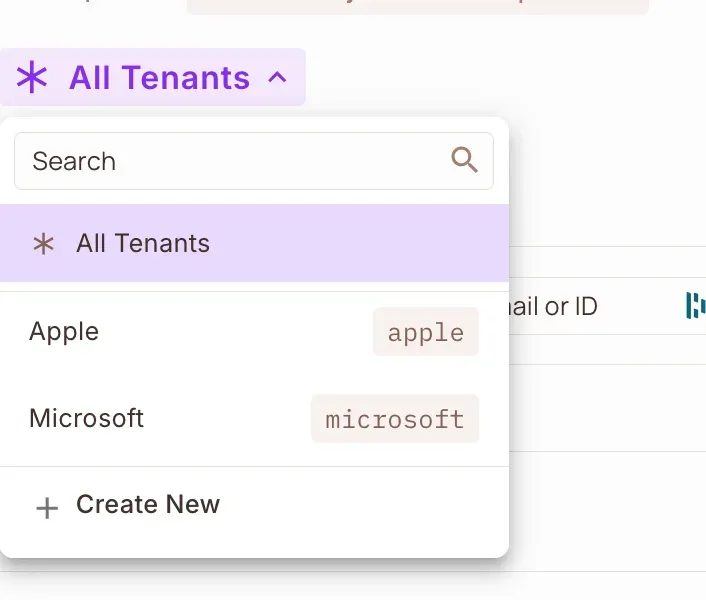
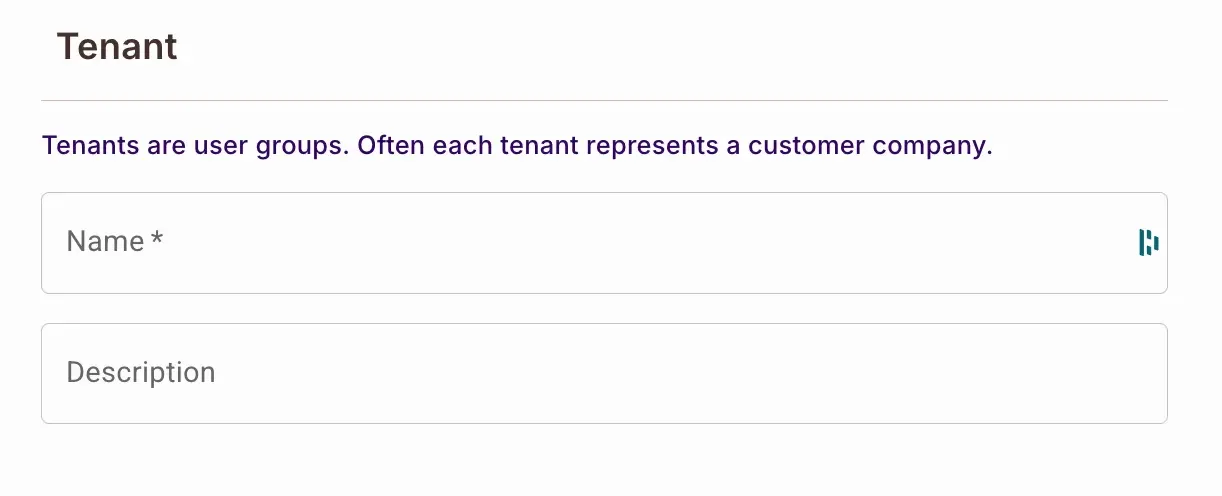
Configure:
- Name: TechCorp
- Description: techcorp
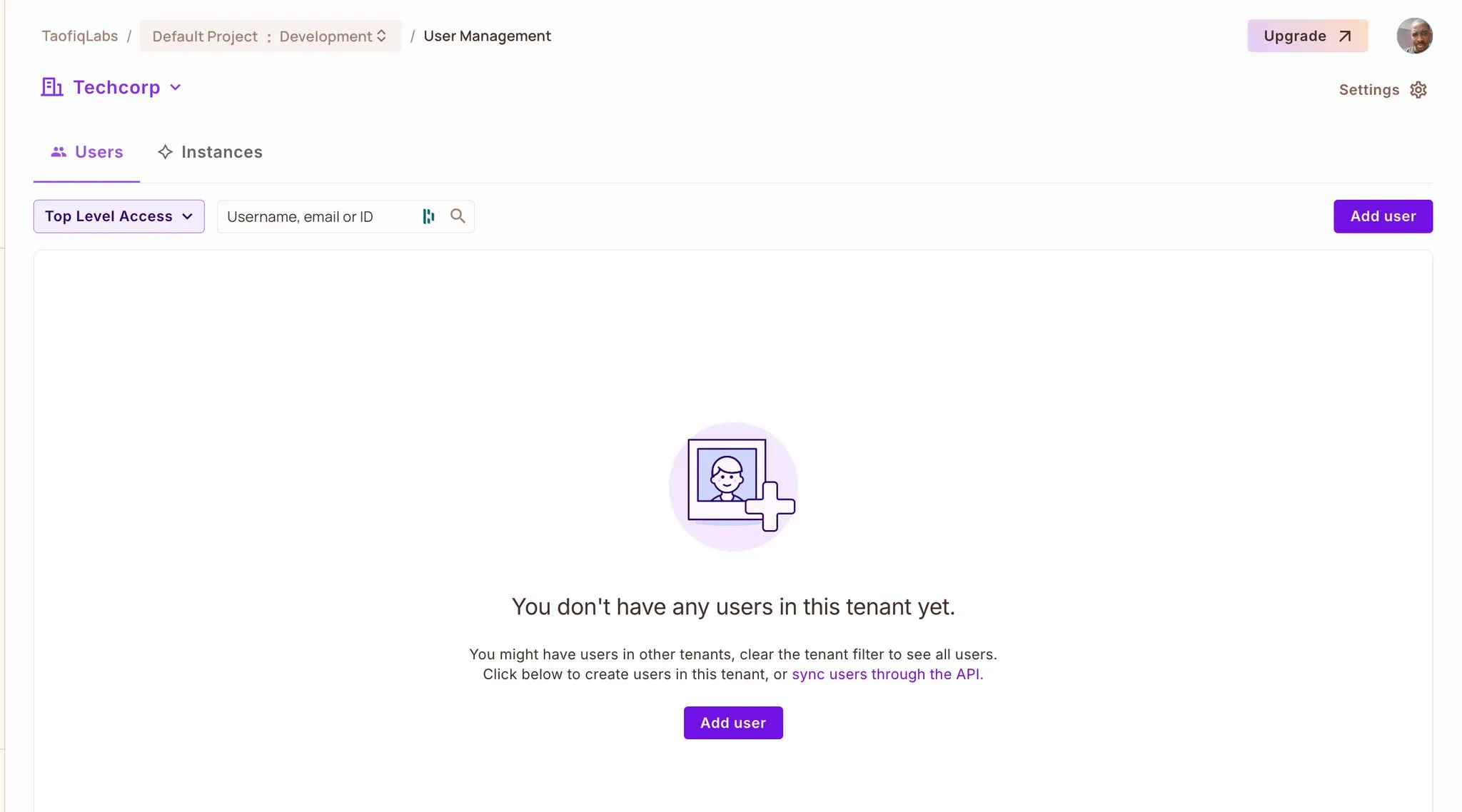
Click on Add Tenant, to create a new tenant.
Under the created tenant, click Add users to add new users under the tenant.
Configure the details in the popup modal on the right section of the page and click on Save.
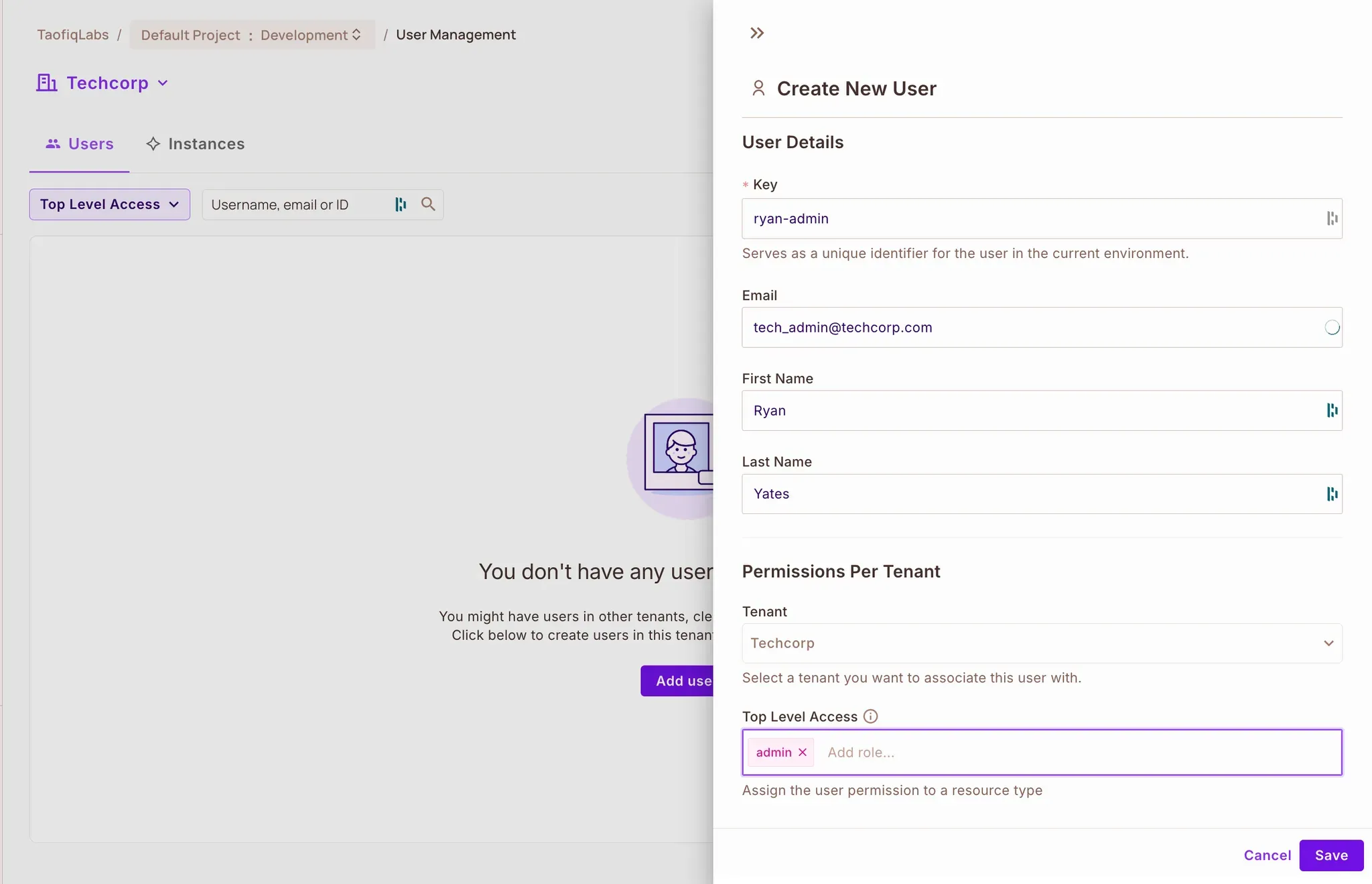
Add users:
tech_admin@techcorp.com (Admin role)
tech_editor@techcorp.com (Editor role)
tech_viewer@techcorp.com (Viewer role)
FinanceHub Setup:
Follow the same steps:
- Name: FinanceHub
- Key: financehub
Add corresponding users with their roles.
Verifying Our Setup
In the Policy Editor, we can now see the complete permission matrix—neatly organized by tenant—which shows which roles can perform what actions on our documents. This visualization helps us verify that our RBAC structure is correctly configured.
With our permission model configured in Permit, we’re ready to build our document management system. The clear separation between permission logic and application code will make our implementation both cleaner and more maintainable.
Automated User and Tenant Setup
While we configure roles and policies in the dashboard, you can automate the creation of test users and tenants using our setup script:
Clone the repository
git clone <https://github.com/[repo]/express-rbac-docs-manager>
cd express-rbac-docs-manager
Install dependencies
npm install
Run the setup script
node scripts/setup-permit.js
This script creates two tenants, TechCorp and FinanceHub, and sets up test users with their assigned roles for each tenant. This allows you to quickly test the permission model we’ve configured.
Implementing Our Multi-tenant Document Management System
With our permissions configured in Permit.io, let’s build our Express application. We’ll create a simple and effective system where companies can manage their documents securely.
All code for this tutorial is available on GitHub: express-rbac-docs-manager. Clone it to follow along or reference the complete implementation.
Project Structure
src/
├── config/
│   └── permit.js      # Permit.io configuration
├── middleware/
│   └── permit.js      # Permission checks
├── routes/
│   └── documents.js   # Document endpoints
└── index.js          # Application entry
Connecting to Permit
In config/permit.js, we establish our connection to Permit.io:
const { Permit } = require("permitio");
require("dotenv").config();

const permit = new Permit({
  token: process.env.PERMIT_API_KEY,
  pdp: process.env.PERMIT_PDP_URL,
});

module.exports = permit;
Guarding Our Routes
Our permission middleware in middleware/permit.js acts as a gatekeeper, ensuring users can only access documents they’re allowed to:
const permit = require("../config/permit");

const checkPermission = (action) => async (req, res, next) => {
  const { user } = req;

  try {
    const allowed = await permit.check(user.id, action, {
      type: "Documents",
      tenant: user.tenantId,
    });

    if (!allowed) {
      return res.status(403).json({
        error: "Permission denied",
      });
    }

    next();
  } catch (error) {
    res.status(500).json({
      error: "Permission check failed",
    });
  }
};

module.exports = checkPermission;
Managing Documents
In routes/documents.js, we create endpoints that respect tenant boundaries. For demonstration, we’ll work with some sample documents:
const router = require("express").Router();
const checkPermission = require("../middleware/permit");

// In-memory document store for demo
const documents = [
  {
    id: 1,
    title: "Tech Roadmap 2025",
    content: "AI integration plans and cloud migration strategy",
    tenantId: "techcorp",
    createdBy: "tech_admin@techcorp.com",
  },
  {
    id: 2,
    title: "Q1 Financial Report",
    content: "First quarter financial analysis and projections",
    tenantId: "financehub",
    createdBy: "finance_admin@financehub.com",
  },
  {
    id: 3,
    title: "Development Guidelines",
    content: "Coding standards and best practices",
    tenantId: "techcorp",
    createdBy: "tech_editor@techcorp.com",
  },

  {
    id: 4,
    title: "Investment Strategy",
    content: "2025 investment guidelines and portfolio allocation",
    tenantId: "financehub",
    createdBy: "finance_editor@financehub.com",
  },
];

// Get all documents (tenant-specific)
router.get("/", checkPermission("read"), (req, res) => {
  const tenantDocs = documents.filter(
    (doc) => doc.tenantId === req.user.tenantId
  );
  res.json(tenantDocs);
});

// Create document
router.post("/", checkPermission("create"), (req, res) => {
  const { title, content } = req.body;
  const doc = {
    id: Date.now(),
    title,
    content,
    tenantId: req.user.tenantId,
    createdBy: req.user.id,
  };

  documents.push(doc);
  res.status(201).json(doc);
});

// Update document
router.put("/:id", checkPermission("update"), (req, res) => {
  const { title, content } = req.body;
  const docIndex = documents.findIndex(
    (d) => d.id === parseInt(req.params.id) && d.tenantId === req.user.tenantId
  );

  if (docIndex === -1) {
    return res.status(404).json({ error: "Document not found" });
  }

  documents[docIndex] = {
    ...documents[docIndex],
    title: title || documents[docIndex].title,
    content: content || documents[docIndex].content,
  };

  res.json(documents[docIndex]);
});

// Delete document
router.delete("/:id", checkPermission("delete"), (req, res) => {
  const docIndex = documents.findIndex(
    (d) => d.id === parseInt(req.params.id) && d.tenantId === req.user.tenantId
  );

  if (docIndex === -1) {
    return res.status(404).json({ error: "Document not found" });
  }

  documents.splice(docIndex, 1);
  res.status(204).send();
});

module.exports = router;
Bringing It All Together
Our index.js ties everything together, including a simple mock authentication system:
require("dotenv").config();
const express = require("express");
const documents = require("./routes/documents");

const app = express();
app.use(express.json());

// Simulated user context for demonstration
app.use((req, res, next) => {
  req.user = {
    id: req.headers["x-user-id"],
    tenantId: req.headers["x-tenant-id"],
  };
  next();
});

app.use("/documents", documents);

app.get("/health", (req, res) => {
  res.send("Server is up and running");
});

app.listen(3000, () => {
  console.log("Server running on port 3000");
});
Testing Our Implementation
Let’s see our RBAC in action. Try these commands:
- TechCorp admin viewing their documents:
curl <http://localhost:3000/documents> \\
  -H "x-user-id: tech_admin@techcorp.com" \\
  -H "x-tenant-id: techcorp"
- FinanceHub user creating a document:
curl -X POST <http://localhost:3000/documents> \\
  -H "Content-Type: application/json" \\
  -H "x-user-id: finance_admin@financehub.com" \\
  -H "x-tenant-id: financehub" \\
  -d '{"title": "Budget Report", "content": "Q2 financial projections"}'
Our implementation ensures that:
- Users only see documents from their own tenant
- Actions are checked against user permissions
- Document operations maintain tenant isolation
- Each request is validated through Permit.io
Monitoring with Audit Logs: Tracking Document Access
Let’s look at a real-world example:
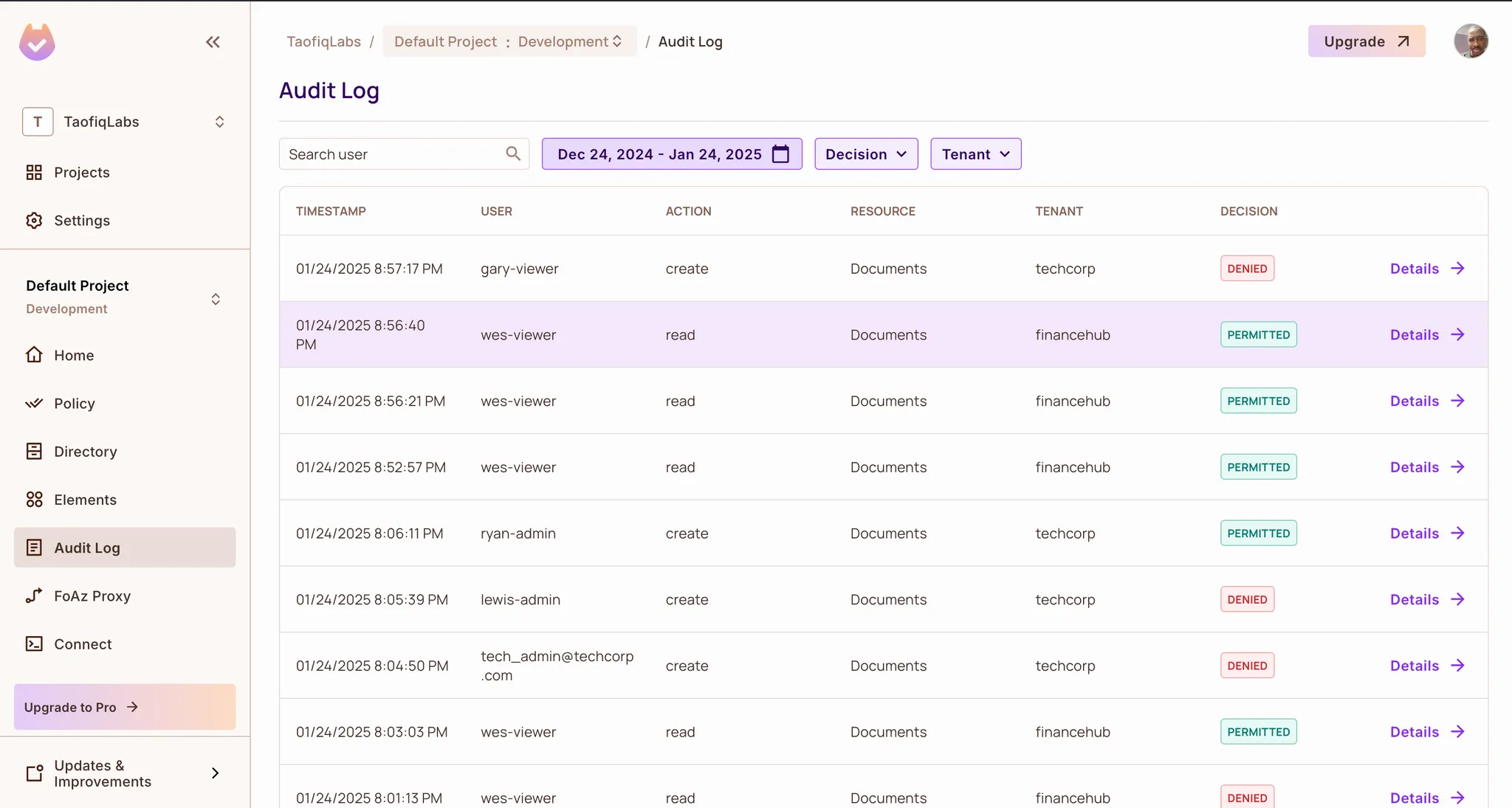
Gary, a Viewer at TechCorp, tries to create a new document. His role does not grant this permission, so the system denies the request. Without an audit log, this event would go unnoticed. With Permit.io’s built-in logging, however, every action is recorded:
- User: Gary (Viewer)
- Action: Attempted to create a document
- Result: DENIED
- Timestamp: 01/24/2025 8:57:17 PM
- Reason: Viewers do not have document creation permissions
How Audit Logs Improve Security and Management
With these logs, administrators can:
- Identify unauthorized access attempts – Spot users who repeatedly try to exceed their permissions.
- Monitor document interactions – Track which employees access or modify critical files.
- Ensure tenant isolation – Verify that TechCorp and FinanceHub documents remain separate.
- Adjust permissions proactively – Use log data to refine role definitions and prevent access issues.
By enabling real-time tracking of document access, Permit.io helps maintain security and compliance without adding complexity to the application.
Accessing Your Audit Trail
Permit.io provides built-in audit logging that you can access in two ways:
Through the Dashboard:
Navigate to the “Audit Log” section to see a comprehensive view of all document operations. You can filter by:
- Tenant (TechCorp or FinanceHub)
- Decision (PERMITTED or DENIED)
- Date Range
- Specific users
2. Via the PDP Logs:
For self-hosted environments, access detailed logs directly from your Policy Decision Point.
Understanding Log Entry Structure
Every audit log entry provides a detailed record of an access attempt, helping administrators track activity and enforce security policies. Here’s an example of a logged event:
Timestamp: 01/24/2025 8:57:17 PM
User: gary-viewer
Action: create
Resource: Documents
Tenant: techcorp
Decision: DENIED
- User information – Who attempted the action.
- Role assignments – The user’s assigned role (Viewer, in this case).
- Permission check results – What the system verified before making a decision.
- Denial reason – The exact rule that prevented access (e.g., "Viewers cannot create documents").
How Audit Logs Improve Access Management
By analyzing audit logs, administrators can:
- Identify access patterns – See how users interact with documents across tenants.
- Detect permission issues – Spot frequent denials that may indicate role misconfigurations.
- Ensure tenant isolation – Verify that users only access data within their organization.
- Recognize security risks – Flag unusual behavior, such as repeated unauthorized attempts.
These insights help maintain tight access control while ensuring that organizations like TechCorp and FinanceHub keep their documents secure and properly managed.
Conclusion
This guide demonstrated how Express.js and Role-Based Access Control (RBAC) work together to solve real-world authorization challenges. Instead of scattering permission checks throughout the application, we structured access control using RBAC principles, ensuring that Admins, Editors, and Viewers have clearly defined permissions within their respective organizations.
By leveraging Express.js middleware, we centralized authorization logic, keeping our route handlers clean and focused on business logic. Integrating Permit.io further helps the process, enforcing permissions efficiently and ensuring TechCorp and FinanceHub can securely manage their documents with strict tenant isolation.
RBAC ensures that authorization remains structured, predictable, and easy to manage, even as the application grows.
Want to learn more about implementing authorization in your applications? Join our Slack community to connect with other developers and explore best practices for managing access control.