Building authorization can be a complicated endeavor. There are different models for building authorization and different ways of implementing them. At the end of the day, only one thing matters - we want the right person to have the right access to the right thing. Authorization is not to be confused with Authentication, which is about verifying a user's identity.
ReBAC is an alternative model to other common ones - such as Role Based Access Control (RBAC) and Attribute Based Access Control (ABAC). Note that these models are more thinking tools than concrete guidelines, and most applications end up mixing between them (especially as time passes and the applications evolve). It’s up to developers to pick the most suitable authorization model for their application at each moment in time.
In this blog, we will learn how to implement ReBAC with Open Policy Agent - an open-source policy engine for controlling access to systems and resources. OPA allows separating policy logic from application code, enabling easy policy management and updates without requiring code changes or deployments.
What is ReBAC?
ReBAC is a policy model focused exclusively on the relationships, or how resources and identities (aka users) are connected to each other and between themselves. The consideration of these relationships allows us to create authorization policies for hierarchical structures.
ReBAC allows us to derive authorization policies based on existing application-level relationships. Creating policies based on relationships, rather than roles or attributes, saves us from having to create authorization policies on a per-instance basis.
To better understand how ReBAC works, let’s look at two of the most common relationship types ReBAC allows us to handle:
Parent-child hierarchies are relationships where resources are nested under other resources. This allows us to create a policy such as:
A user who is assigned the role of an Owner on a folder will also get the Owner role on every file within that folder.
We can see that the user's access to the files is derived from the combination of two elements: The nesting of the files within the folder and their role on the folder.
Organizations are relationships based on grouping together users. This allows us to create a policy like:A user who is assigned the role of Member on RnD Team will also be assigned the role of Editor on RnD File when the RnD Team is the Parent of RnD File.
Putting several users in one group allows us to derive policies based on their group membership, instead of per individual user.
A more in-depth review of ReBAC, including examples and implementation instructions, is available here.
Why use Open Policy Agent (OPA) for ReBAC policies?
The initial setup of policies for each individual service requires manual configuration within the service itself. As your policies, users, and services expand, managing updates across all relevant services becomes tedious and time-consuming.
Mixing the authorization layer's code with that of the application itself also creates difficulties when upgrading, adding capabilities, and monitoring the code as it is replicated across various microservices.
OPA allows us to create a separate microservice solely dedicated to authorization, effectively decoupling policies from the core application code. Controlling access management centrally through a separate authorization service allows you to offer it as a service to every system that needs to check whether a user can or cannot access its resources.
OPA unifies all policies across each individual service in one server.
It takes on the role of policy decision-making and enforcement from the service:
The service queries OPA, OPA makes a decision, sends an output to the service, and the service acts according to OPA’s reply.
It allows you to have a policy as code that can be easily reviewed, edited, and rolled back.
How to implement ReBAC in OPA?
In order to implement a ReBAC model using OPA, we will need to follow several steps:
First, we must map out the policies we want to enforce. This will help us better understand what we want our authorization layer to accomplish from a functional perspective.
Map out the specific building blocks of our implementation - Resources, Actions, and Resource Roles.
Map out our Relationships and Role Derivations. These will allow us to create ReBAC policies.
Create a data file that will contain all of the relevant policy information in Rego
Write Rego code that checks access based on our created policy via the `graph.reachable()` function.
How will our Rego code work:
Here's our ReBAC Rego code:
# return a full graph mapping of each subject to the object it has reference to
full_graph[subject] := ref_object {
	some subject, object_instance in object.union_n([files, teams,organizations])
	# get the parent_id the subject is referring
	ref_object := [object.get(object_instance, “parent_id”, null)]
}
# … see full Rego code at https://play.openpolicyagent.org/p/4qkNc0GtPP
# rule to return a list of allowed assignments
allowing_assignments[assignment] {
	# iterate the user assignments
	some assignment in input_user.assignments
	# check that the required action from the input is allowed by the current role
	input.action in data.roles[assignment.role].grants
	# check that the required resource from the input is reachable in the graph
	# by the current team
	assignment.resource in graph.reachable(full_graph, {input.resource})
}
The full rego code is available in the OPA Playground
The code builds a full graph based on the teams, files, and teams.
Iterates over the roles and teams assigned to the user by which the access request was made.
Using the `graph.reachable()` function, it checks the graph to see if the user has the appropriate team and role assignment to access the requested resource.
If there is a correlation between the user team assignment, the file team assignment, and the role, the request is allowed (allow rule returns true). Otherwise, the request is denied by default.
*reach / reachable - means that the file node in the graph is linked to the team node in the graph
It’s important to note that `graph.reachable()` is a built-in function available in OPA since version v0.20.0.
Let’s go over these steps with a concrete example -
ReBAC with OPA demo application:
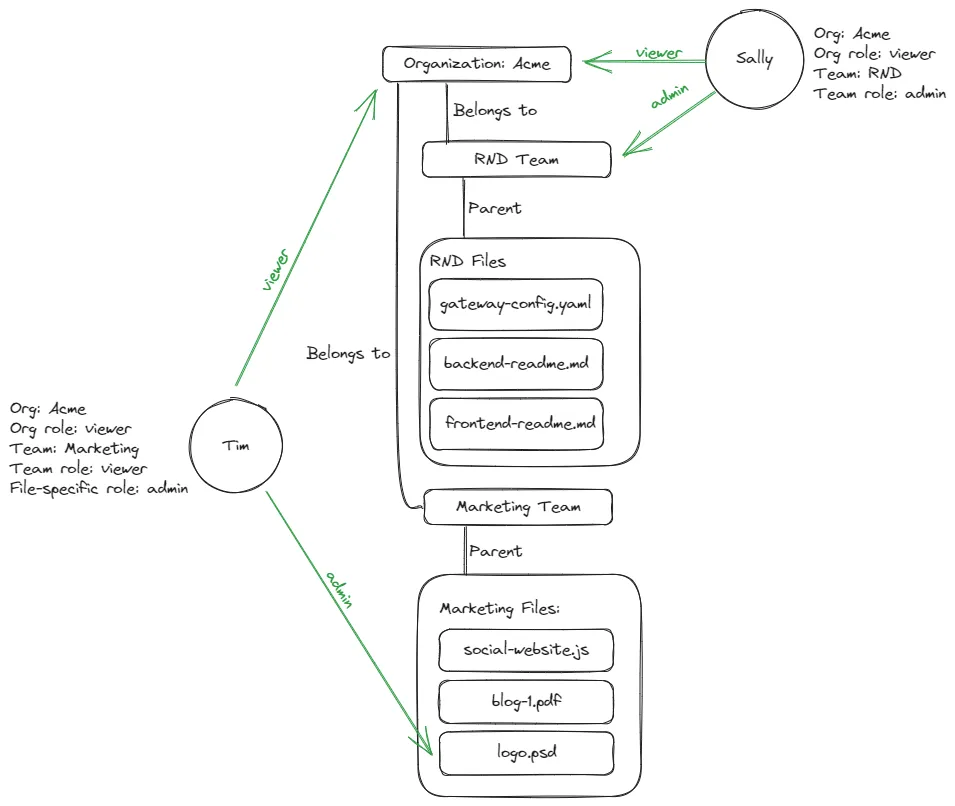
Take an organization’s file system. The organization consists of two teams, with each team having a list of files associated with it. Apart from that, we have a file within one of the teams associated with a specific user.
Here is a visual representation of the relationship policy we wish to set up:
To set up our ReBAC policy as Rego code, we will need to follow these steps:
1. Map out the policies we want to enforce:
Every user part of the “Acme” organization should have “View” access to every instance within the file system.
A user assigned as the Admin of a team should have “Admin” access to every file associated with their team.
Tim, the company’s designer, should have “Admin” access to “logo.psd”.
2. Mapping our Application Resources and Actions
Let’s map out all of the resources we require in our application, as well as the actions that can be performed on each resource:
Organization: View
Team: View, Edit.
Files: View, Edit.
3. Mapping our Resource Roles
In ReBAC, roles are not system-wide entities assigned to users (Like in RBAC). ReBAC requires us to set up roles per resource. This means that every single one of the resources we previously defined is going to have roles associated with it. Here are the roles we will have to associate with the resources in our demo application:
Organization: Member (View)
Team: Admin (View, Edit), Teammate (View)
Files: Admin (View, Edit), Teammate (View)
4. Mapping our Resource Relationships
Now, it’s time to define the relationships between all of our resources. This will allow us to create authorization policies based on these relationships later on:
Marketing Files are nested under the Marketing Team.
RND Files are nested under the RND Team.
Both teams are nested under the “Acme” organization.
5. Deciding on our Role Derivations
If a user is a Member of the organization, they should have the viewer role on every resource nested under the organization.
If a user is the Admin of a team, they should receive an admin role on every file instance in that team.
6. Let’s take a look at our users, Sally and Tim:
Sally:
Is part of the Acme organization
Has the organizational role of `viewer`. Based on our derivations, she should be assigned the role of a viewer to every file within the organization.
Is part of the RND team
Has the team role of `admin`- Based on our derivations, she should receive the admin role on any file associated with the RND team.
Tim:
Is part of the Acme organization
Has the organizational role of `viewer`. Based on our derivations, he should be assigned the role of a viewer to every file within the organization.
Is part of the Marketing team
Has the admin role over the file `logo.psd`, him them to perform Admin level actions on this specific file.
Policy Data:
Let’s see how the data for this policy looks in Rego. The data for this policy will consist of five parts:
The organization: In our case, Acme, is the parent organization under which we have several teams. In a more complex scenario, we can have several different organizations with a more detailed hierarchy.
{
"organizations": [
{
"id": "acme"
}
}
Teams: a list of all available teams. Both files and users will be associated with their respective teams:
{
    "teams": [
        {
            "id": "rnd",
            "parent_id": "organization:acme"
        },
        {
            "id": "marketing",
            "parent_id": "organization:acme"
        }
}
Roles: a list of all possible user roles relevant to the policy, along with the scopes for each role:
{
    "roles": {
        "admin": {
            "grants": [
                "view",
                "edit"
            ]
        },
        "viewer": {
            "grants": [
                "view"
            ]
        }
}
Users: a list of our users, and their ids (For the purposes of this example, the ids are a combination of a user's team association and allocated role. In an actual scenario, these ids can be a user's email, a unique GUID, or whatever you choose it to be) and their assigned roles and teams:
{
    "users": [
        {
            "assignments": [
                {
                    "resource": "organization:acme",
                    "role": "viewer"
                },
                {
                    "resource": "team:rnd",
                    "role": "admin"
                }
            ],
            "id": "sally"
        },
        {
            "assignments": [
                {
                    "resource": "team:marketing",
                    "role": "viewer"
                },
                {
                    "resource": "file:design.psd",
                    "role": "admin"
                }
            ],
            "id": "tim"
        }
    ]
}
Files: a list of all the files relevant to the policy, along with their “team_id”, which associates them to a specific team:
{
    "files": [
        {
            "id": "backend-readme.md",
            "parent_id": "team:rnd"
        },
        {
            "id": "frontend-readme.md",
            "parent_id": "team:rnd"
        },
        {
            "id": "gateway-config.yaml",
            "parent_id": "team:rnd"
        },
        {
            "id": "website.js",
            "parent_id": "team:marketing"
        },
        {
            "id": "blog-1.pdf",
            "parent_id": "team:marketing"
        },
        {
            "id": "logo.psd",
            "parent_id": "team:marketing"
        }
}
Now that we have our data established, let’s decide on the access policy we want to check for.
In this example, let’s check if `sally` can `edit` `gateway-config.yaml`.
To perform this check, this will be our input:
{
      "user": "sally",
      "action":"edit",
      "resource":"file:gateway-config.yaml"
}
This results in the response you’d expect: True.
Congrats! You have successfully implemented ReBAC in OPA!
A full demo repository of this Rego example is available here.
Let’s go over what each part of the code and what it means in more detail:
resource_instances and teams rules: These rules create sets of resources and teams by their ids, respectively. They iterate over the data.resources and data.teams sets and extract the id of each instance. The result is a set where each item is the id of a resource or team.
full_graph rule: This rule constructs a graph where the nodes are subjects (either a resource or a team), and the edges are references to other objects in the graph. The graph is represented as a dictionary where the key is the subject id, and the value is the parent id of the object it’s referring to.
users and input_user rules: The users rule creates a set of users by their ids. The input_user rule then uses the user id from the input to get the user’s details from this set.
allowing_assignments rule: This rule filters the assignments of the input_user to find those that allow to perform the requested action on the specified resource. It does so by checking two conditions:
The requested action is in the list of actions granted by the role associated with the assignment (using the data.roles[assignment.role].grants expression).
The team associated with the assignment can reach the requested resource in the graph. This is done using the graph.reachable(full_graph,{input.resource}) function, which presumably checks if there is a path from the assignment’s team to the resource in the full_graph.
default allow and allow rules: These are the main decision rules of the policy. The allow rule will be true if there is at least one assignment that allows the action on the resource (as determined by the allowing_assignments rule). If there are no such assignments, the default allow rule sets the decision to false.
Scalable Implementation
As application requirements evolve, the need to shift from simple authorization models to ReBAC can arise rapidly. Implementing and managing such complex authorization systems can be challenging for developers and other stakeholders, potentially leading to bottlenecks and inflexibility.
Setting up a system as complex as ReBAC could take months of work, which doesn’t end at the point of implementation - as creating additional roles, attributes, and policies requires complex R&D work and steep learning curves.
The solution is implementing and managing your RBAC, ABAC, or ReBAC policies using an authorization service that allows for flexible transition between authorization models and provides a simple no-code UI that makes permission management accessible to other stakeholders.
That’s where Permit comes in -
Permit provides developers with a permission management solution that allows for both smooth transitioning between RBAC, ABAC, and ReBAC without any changes to your application code, and the ability to create and manage policies using an accessible no-code UI.
Permit’s UI generates Rego code for RBAC, ABAC, and ReBAC, wrapping it nicely into Git, and API / UI interfaces which you can edit, add to, and manage however you like.
This allows both developers and other stakeholders to set up ReBAC policies and add complex graph hierarchies - all without having to write a single line of code.
Permit ReBAC is easily approachable via the low-code policy editor. You can easily define the relations (graph edges) between the resources (graph nodes) with a few clicks, and there’s no need to learn a complex schema language to begin.
You can check out how ReBAC can be implemented by using Pemit’s no-code UI here.
Implementing authorization with Permit ensures that everyone is included in the permission management process, preventing developers from becoming bottlenecks while also allowing a smooth transition between RBAC, ABAC, and ReBAC.
Want to learn more about Authorization? Join our Slack community, where there are hundreds of devs building and implementing authorization.