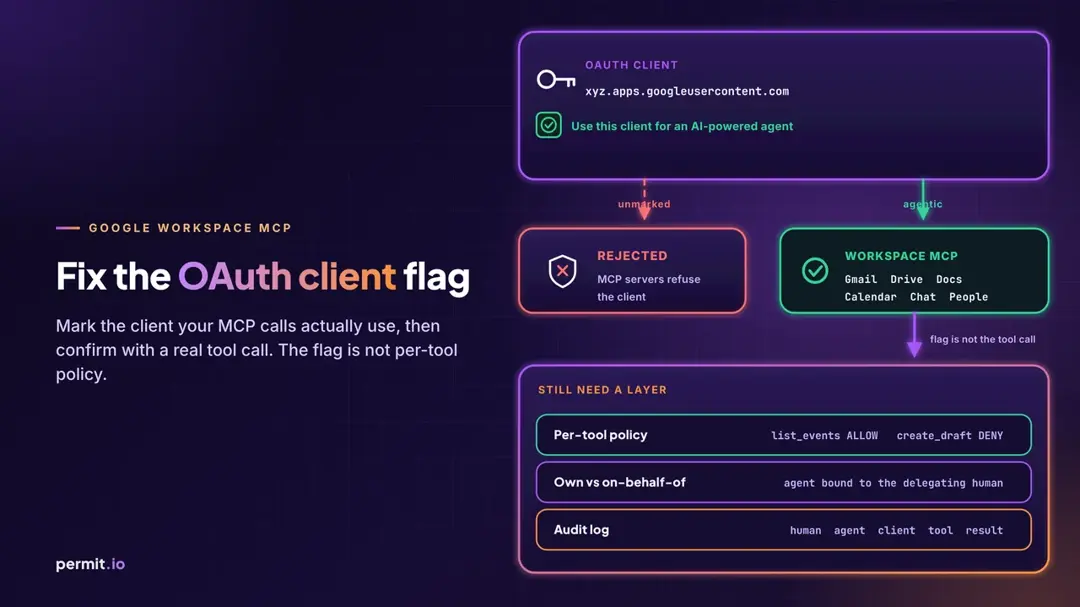
If your agents started getting rejected by Google's hosted Workspace MCP servers this week, start with the OAuth client ID those calls actually use. In Google Auth Platform > Clients, that user-delegated client needs Use this client for an AI-powered agent selected. A successful sign-in is not enough. You need one harmless tool call to prove the MCP server accepted the request.
Google announced the change in its October 12, 2026 Workspace developer release notes. Starting November 11, 2026, Google Workspace MCP servers reject requests from any app or integration whose OAuth client is not marked as agentic. OAuth clients that were still unmarked on November 12, 2026 remain non-agentic and can't call those servers. To keep using MCP, you create a new OAuth client marked as agentic and update your app to use it.
How to fix a rejected Google Workspace MCP OAuth client
1. Find the client ID your MCP calls actually use
Open the config your MCP client uses: mcp_config.json for Antigravity, the custom connector settings in Claude, or whatever your stack stores as clientId. That is the user-delegated OAuth 2.0 client ID Google will check. Do not assume it is the same client your REST app has used for years. If you have more than one client in the project, match the ID character for character.
2. Mark it, or split it
In Google Auth Platform > Clients, open that client.
- If the console still lets you select Use this client for an AI-powered agent, and this client is only used for the agent, select it.
- If the same client also backs non-agent features (a regular web or mobile app that only calls Workspace REST APIs), do not mark the shared client. The release notes say to create a separate OAuth client for the AI agent, mark only that client as agentic, and keep the existing client for your non-agent features.
3. If the setting is locked, create a new agentic client
Google's create access credentials guide says you can't change this setting after you create the client. The October 12 notes add a deadline: OAuth clients that are not marked as agentic by November 12, 2026 remain non-agentic and can't call Google Workspace MCP servers. To use MCP after that date, you need to create a new OAuth client marked as agentic and update your app to use it.
When you create the new client, select Use this client for an AI-powered agent before you click Create. Then put the new client ID and secret into your MCP client config, including the authorized redirect URI your client already uses.
4. Confirm with a harmless tool call
Sign-in can succeed and the next MCP request can still be rejected. After you point the client at an agentic ID, make one low-risk call: list calendars, read your own profile, or search Drive for a file you already have. If that tool returns data, the MCP server accepted the client. If the request is rejected, go back to the troubleshooting section in Google's configure MCP servers guide.
What changed, and which servers it applies to
On October 12, 2026, Google published the same requirement for the hosted MCP servers for Gmail, Google Drive, Google Docs, Google Sheets, Google Slides, Google Calendar, and Google Chat.
The current configure the Google Workspace MCP servers guide, last updated November 6, 2026, applies the same rule to user-delegated OAuth 2.0 client IDs that call the Google Workspace MCP servers. The supported product list on that page also includes People and Classroom. Those hosted servers are available as part of the Google Workspace Developer Preview Program.
Apps and integrations that are not AI agents, like those that only call Google Workspace REST APIs, are not affected.
A few paths do not use this checkbox the same way, as that configuration guide describes:
- Service accounts with domain-wide delegation are not managed in Google Auth Platform > Clients, so you can't select the agent setting on them. Requests from those accounts are not rejected for missing the setting. Access is governed by the domain-wide delegation settings your Workspace admin manages. The MCP servers still return form elicitation prompts for sensitive tool calls made through that impersonation.
- Apps Script's default OAuth client can't have the flag, even if the script uses a standard Google Cloud project. To call the MCP servers from Apps Script, create an OAuth client with the agent setting selected, authorize users with the OAuth2 for Apps Script library, and send that access token instead of the token from
ScriptApp.getOAuthToken.
Use this client for an AI-powered agent is a setting on the OAuth client in Google Auth Platform > Clients. It tells Google this client represents an AI agent acting on a user's behalf.
It does not add OAuth scopes. Scopes are still configured under Data Access on the OAuth consent screen. The flag also does not decide which tool this agent may call for this user right now, on which mailbox or document, with which arguments. A marked client with a Gmail compose scope can still draft mail the user would never send. The same is true of a Drive-scoped client that can read a file policy should have blocked.
OAuth on MCP is the right foundation: it authenticates the client session and binds user delegation to the server. We walk through that in MCP OAuth 2.1: PKCE, Resource Metadata and Authorization. It still does not decide whether this specific tool call should run now, with these arguments, for this user. Enterprise-managed authorization can skip the consent screen at the organization level, so per-tool policy and audit matter even more. Treating the agent like a service account still leaves a gap at runtime, which is the point of Agent Identity vs. Service Accounts.
The layer you still need:
- Per-tool policy. Allow
calendar.list_events and deny gmail.create_draft for the same user, or make the decision conditional on the resource the tool is about to touch. Evaluate it on every call.
- Own vs on-behalf-of identity. Give the agent its own identity, carry the human as on-behalf-of context, and evaluate policy on every tool call so the agent cannot exceed that user's current access. When that person's access is revoked, policy on the next call should deny it.
- Audit. Log the human, the agent, the client ID, the tool, the arguments, and whether the call was allowed or denied.
Where Permit MCP Gateway fits
Permit MCP Gateway sits in front of MCP servers and checks each tool call against policy before the request reaches the server. As shared in our docs, it authenticates the human behind each agent, shows a consent screen with the tools an agent can call, keeps upstream credentials in the gateway, and writes an audit log of allowed or denied calls. It is designed to sit in front of standards-compliant MCP servers. We do not currently ship a Google Workspace MCP integration.
Frequently asked questions
Why is my Google Workspace MCP OAuth client rejected?
The hosted Google Workspace MCP servers reject user-delegated OAuth clients that do not have Use this client for an AI-powered agent selected in Google Auth Platform > Clients. Find the client ID your MCP calls actually use, mark it if you still can, or create a new agentic client and point your app at it.
Why did my Gmail MCP server or Google Drive MCP server calls start failing?
The hosted Gmail MCP server and Google Drive MCP server are among the Google Workspace MCP servers that now require an agentic OAuth client. If your agent signs in but its Gmail or Drive tool calls fail, check whether the client ID behind those calls has Use this client for an AI-powered agent selected, then follow the fix steps above.
When did this start?
Google published the requirement on October 12, 2026. Rejection started November 11, 2026. Clients that were still unmarked on November 12, 2026 remain non-agentic.
Does this affect apps that only call Google Workspace REST APIs?
No. Apps and integrations that are not AI agents, like those that only call Google Workspace REST APIs, are not affected.
Which Google Workspace MCP servers require the agentic client?
The October 12 release notes named Gmail, Drive, Docs, Sheets, Slides, Calendar, and Chat. The current configuration guide applies the same user-delegated client requirement to the Google Workspace MCP servers, and the supported product list also includes People and Classroom.
What if I can't tick the box on my existing client?
Create a new OAuth client, select Use this client for an AI-powered agent when you create it, and update your MCP client to use the new ID and secret. If the existing client also supports non-agent features, keep that client for those features and use the new one only for the agent.
Does the agentic flag control which tools an agent can call?
No. The flag marks the OAuth client as an AI-powered agent. Scopes are configured separately under Data Access. Per-tool policy, the human the agent is acting for, and an audit log of each call are still a separate layer.
Does a successful Google sign-in mean the MCP server will accept the call?
No. Sign-in can complete with a client that the MCP server will later reject. Make one harmless tool call after you change the client.