So, your coding agent just shipped an MCP server. It has OAuth, a .well-known endpoint, a token check, and a very confident commit message. Does any of it actually hold? "The agent said the tests pass" is not evidence. MCP authentication is only as good as the tests you run against it from the outside.
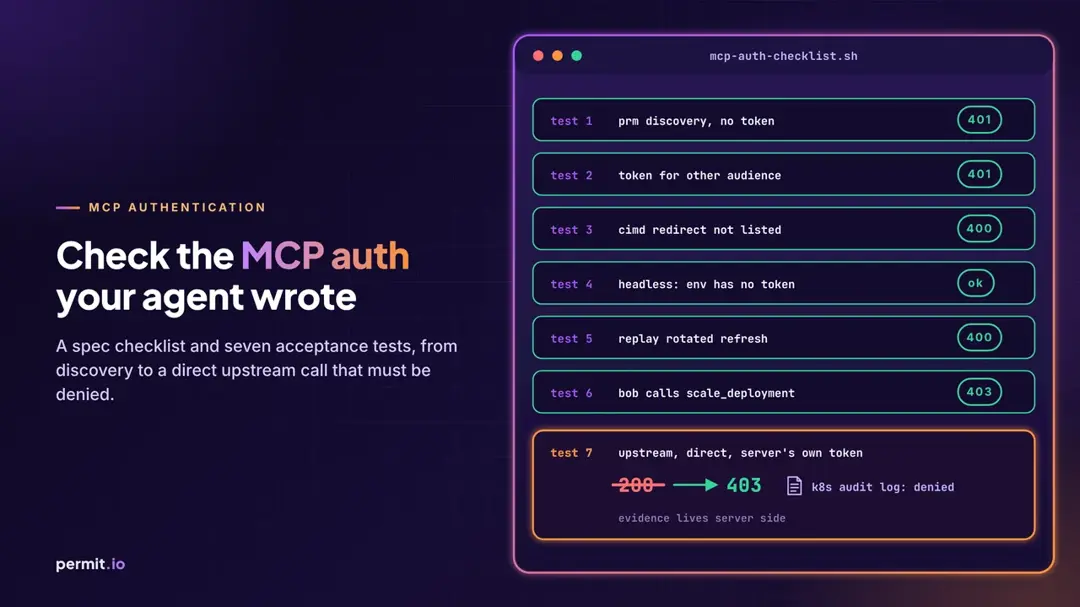
This is the checklist I'd hand an engineer reviewing agent-written MCP auth: what the current MCP spec requires, and seven acceptance tests with what to send, what you should get back, and what counts as proof. For the OAuth flow itself, and for where authentication ends and authorization begins, we already wrote the long version in MCP OAuth 2.1: PKCE, Resource Metadata and Authorization. I won't repeat it here.
Start with an incident that had no exploit in it
Chainstack published an incident report that is worth reading in full. As they describe it, the chain started with a test Grafana instance where "its default administrator credentials had never been changed." From there, the attacker used Grafana's data-source proxy. The report notes that "A Grafana administrator can create a data source with any URL," and that "The proxy had no destination allowlist, and no network policy restricted where Grafana could connect."
Next the attacker reached an internal MCP tool server that exposes Kubernetes operations to AI agents. "It required no authentication and ran with a service account bound to cluster-admin."
Two more lines from the report keep me coming back to it. First: "We found no evidence that a software vulnerability was exploited." The whole chain ran on configuration. Second, on what happened on that server: "the individual tool calls could not be recovered."
The report's own list of changes includes this: "Internal services that expose privileged operations require authentication and least privilege, wherever they run." I'd group the failed controls into three, and each one maps onto the checklist below:
- Authentication on internal MCP servers. "Internal" describes where a server sits on the network. It doesn't stop anyone who gets there.
- A least-privilege service account behind the server, plus per-tool authorization. With a cluster-admin service account, every tool can do everything the cluster can.
- A tool-call audit log you can recover. If you can't say which tool ran, with which arguments, on whose behalf, you're left reconstructing events from network flows.
None of this is a dig at Chainstack. Plenty of teams run exactly this setup and haven't written the report yet, mostly because nobody has looked.
MCP server authentication
One line in the spec explains a lot. Per the Protocol Requirements: "Authorization is OPTIONAL for MCP implementations." And for STDIO, implementations "SHOULD NOT follow this specification, and instead retrieve credentials from the environment."
So an unauthenticated internal MCP server isn't violating anything on paper. Ask an agent to "make the MCP server work" and the shortest path to green is exactly that: no auth, a broad credential in an env var, done. The agent isn't malicious. It's optimizing for the test you gave it, so give it better tests.
The MCP auth checklist
Everything below is checked against MCP specification version 2026-07-28, the current latest at the time of writing.
| # |
Control |
What to verify |
Spec reference |
Chainstack control |
| 1 |
PRM discovery |
Unauthenticated call gets 401 + resource_metadata; PRM lists authorization_servers; AS metadata issuer matches; S256 in code_challenge_methods_supported |
Discovery, Code protection |
Auth on internal servers |
| 2 |
Audience binding |
resource sent on authorize and token requests; tokens for other resources rejected; no token passthrough upstream |
Resource parameter, Token handling |
Auth on internal servers |
| 3 |
CIMD |
client_id is an HTTPS URL with a path, document matches URL exactly, redirect URIs enforced, AS doesn't fetch internal URLs |
Client registration |
Proxies that fetch any URL |
| 4 |
Headless / remote login |
No long-lived tokens pasted into env or config; login works from a remote box without weakening audience or redirect rules |
Overview, Communication security |
Long-lived credentials |
| 5 |
Refresh |
Expired token gets 401; public-client refresh tokens rotate; revoked users stop working |
Refresh tokens, Token theft |
Long-lived credentials |
| 6 |
Per-tool check after login |
A valid token for the wrong user or wrong arguments is denied; every call lands in a recoverable audit log |
Scope challenges, Scope minimization |
Per-tool authorization, audit log |
| 7 |
Direct-upstream bypass |
The credential the MCP server holds can't do damage when used outside the server; denial proven in upstream logs |
Access token privilege restriction |
Least-privilege service account |
The acceptance tests
The examples use https://mcp.example.com/mcp as the MCP server and https://auth.example.com as the authorization server. Swap in yours. One rule for all seven: a status code printed on the client is a hint. Evidence is a server-side log line you can point to, with a timestamp, the identity, and the reason.
Test 1: Protected Resource Metadata discovery
MCP servers that implement authorization MUST implement OAuth 2.0 Protected Resource Metadata (RFC 9728), either through resource_metadata in the WWW-Authenticate header on a 401, or at a well-known URI. Clients must support both.
# 1a. No token. Expect 401 with a resource_metadata pointer.
curl -si -X POST https://mcp.example.com/mcp \
  -H 'Content-Type: application/json' \
  -H 'Accept: application/json, text/event-stream' \
  -d '{"jsonrpc":"2.0","id":1,"method":"tools/list"}' | head -20

# 1b. Fetch the PRM document (path-inserted form first, then root).
curl -s https://mcp.example.com/.well-known/oauth-protected-resource/mcp \
  | jq '{resource, authorization_servers, scopes_supported}'

# 1c. Fetch AS metadata (RFC 8414 first, OIDC discovery second).
curl -s https://auth.example.com/.well-known/oauth-authorization-server \
  | jq '{issuer, code_challenge_methods_supported, client_id_metadata_document_supported}'
Pass: 1a returns 401 (not 200, not a tool list). authorization_servers has at least one entry. The AS issuer is identical to the issuer you built the URL from; the spec says that if they differ, the client MUST NOT use the metadata. code_challenge_methods_supported exists and includes S256. If it's absent, MCP clients MUST refuse to proceed.
A common agent-written failure is a /.well-known route that returns metadata while /mcp happily serves unauthenticated requests. Publishing metadata enforces nothing, so 1a is the test that matters.
Test 2: Audience binding
Clients MUST send the RFC 8707 resource parameter, set to the server's canonical URI, on both authorization and token requests. Servers MUST validate that tokens were issued for them, and MUST NOT pass the client's token through to upstream APIs. This is the confused deputy problem in protocol form; we covered the agent side of it in The Confused Deputy Problem in AI Agents (and MCP).
# 2a. Get a token for a DIFFERENT resource from the same AS
#     (another MCP server, or any other API). Send it here.
curl -si -X POST https://mcp.example.com/mcp \
  -H "Authorization: Bearer $TOKEN_FOR_OTHER_RESOURCE" \
  -H 'Content-Type: application/json' \
  -H 'Accept: application/json, text/event-stream' \
  -d '{"jsonrpc":"2.0","id":1,"method":"tools/list"}' | head -5

# 2b. If tokens are JWTs, check the audience of a legit one.
python3 -c 'import sys,json,base64;p=sys.argv[1].split(".")[1];print(json.loads(base64.urlsafe_b64decode(p+"="*(-len(p)%4))).get("aud"))' "$TOKEN"
Pass: 2a returns 401, and the MCP server log records the rejection with an audience reason. 2b shows your server's canonical URI. Next, capture the client's outgoing authorize and token requests (AS logs or a proxy) and confirm resource= appears in both. Then call a tool that hits an upstream API and search the upstream access log for the client token's ID or hash. It should never appear there; the upstream should only see a token issued by its own authorization server.
Test 3: Client ID Metadata Documents (CIMD)
In 2026-07-28, CIMD is the SHOULD for clients and authorization servers, and Dynamic Client Registration is marked deprecated, kept for backwards compatibility. If your agent built /register as the primary path, it's probably working from older examples.
curl -s https://app.example.com/oauth/client-metadata.json \
  | jq '{client_id, client_name, redirect_uris}'
Pass: client_id uses https, has a path, and matches the document URL exactly. client_name and redirect_uris are present. Then run two negative tests against the AS:
- Send an authorization request whose
redirect_uri isn't in the document. The AS MUST validate redirect URIs against the metadata, so expect an error and no redirect.
- Send a
client_id URL that resolves to a private address. Remember the Grafana line: "A Grafana administrator can create a data source with any URL." With CIMD, your authorization server fetches a URL a stranger handed it. The spec's best practices say servers SHOULD consider SSRF here. The evidence that counts is the AS egress log showing the fetch was blocked. An error page alone doesn't prove it.
One more that's easy to miss: with localhost redirect URIs, CIMD can't prove which local process is listening. Authorization servers MUST clearly display the redirect URI hostname during authorization. Check that the consent screen actually does.
Test 4: Headless and remote login
This is where agent-written MCP auth gets creative. The agent runs in a container, over SSH, or in CI, there's no browser, and the quickest fix is pasting a token into an env var. Or switching to STDIO, where the spec says credentials come from the environment, which quietly makes that env var your whole security boundary.
What the spec gives you: the core flow is an authorization code flow with PKCE through a browser, and redirect URIs MUST be either localhost or HTTPS. For workloads with no user at all there's a Client Credentials extension, currently a draft. Device authorization for headless clients is covered in our MCP OAuth 2.1 post.
Pass:
env | grep -i -E 'token|bearer|secret' in the agent's runtime and a grep through its MCP config show no long-lived bearer tokens.- Login completes from the remote box with the human consenting on another device, or via a pre-registered or client-credentials identity that a human provisioned on purpose.
- The token from the headless path passes Test 2. Headless shortcuts love to drop the
resource parameter.
- If the answer is STDIO plus a credential in the environment, run Test 7 against that credential first.
Test 5: Refresh
The spec says invalid or expired tokens MUST get a 401, clients MUST NOT assume a refresh token will be issued, and for public clients the AS MUST rotate refresh tokens. MCP servers SHOULD NOT list offline_access in their PRM scopes_supported.
# 5a. Use refresh token R1 once. Save the new R2.
curl -s -X POST https://auth.example.com/token \
  -d grant_type=refresh_token -d refresh_token="$R1" \
  -d client_id="https://app.example.com/oauth/client-metadata.json" \
  -d resource=https://mcp.example.com/mcp

# 5b. Replay R1. Expect an error (typically invalid_grant).
Pass: an expired access token gets 401 from the MCP server. Replaying R1 fails for a public client. Disable a test user at the IdP; their next refresh fails and their tool calls stop within your access-token lifetime. Then time it, because "within the token lifetime" is a number you should know. Evidence: AS logs for the rejected refresh and MCP server logs for the rejected call.
Test 6: Per-tool check after login
Agents skip this one, because a valid token feels like "done." The MCP security best-practices page lists this as a common mistake: "Treating claimed scopes in token as sufficient without server-side authorization logic." Scopes tell you what the client asked for. They don't tell you whether this user, via this agent, may run this tool with these arguments. That's MCP tool authorization, and it's where MCP permissions actually live. Letting an agent inherit the user's full permissions is an anti-pattern. The decision has to account for the human, the agent or client, the tool, and the arguments.
Set up two users who get identical scopes. Alice may run scale_deployment in dev. Bob may only run list_pods.
# 6a. Bob, valid token, tool he isn't allowed to run.
curl -si -X POST https://mcp.example.com/mcp \
  -H "Authorization: Bearer $BOB_TOKEN" \
  -H 'Content-Type: application/json' \
  -H 'Accept: application/json, text/event-stream' \
  -d '{"jsonrpc":"2.0","id":2,"method":"tools/call",
       "params":{"name":"scale_deployment","arguments":{"namespace":"dev","replicas":0}}}'

# 6b. Alice, allowed tool, wrong arguments.
#     Same call with "namespace":"prod" and $ALICE_TOKEN.
Pass: both are denied. If your server uses scopes for the split, the spec's pattern is 403 with error="insufficient_scope" in WWW-Authenticate. If the decision is finer than scopes, your server's tool error is fine, as long as the tool never executes. Evidence: a decision log entry on the server side with user, agent or client, tool, arguments, decision, and reason, plus confirmation in the Kubernetes audit log (or your upstream's equivalent) that no scale request happened.
Then run the audit test, straight from the Chainstack lesson. Make ten tool calls, wipe the MCP server's container, and try to reconstruct all ten from your log store. If you can't, you've reproduced "the individual tool calls could not be recovered" on purpose, which is the cheap way to learn it.
Test 7: Direct-upstream bypass
Everything above protects the front door. This test asks what happens if someone walks around it. Take the credential the MCP server itself holds (service account token, API key, OAuth client secret) and call the upstream API directly, skipping the MCP server and whatever gateway sits in front of it. In the Chainstack setup that credential was bound to cluster-admin, so the answer was "anything."
# 7a. What can the MCP server's identity do? Expect a short, boring list.
kubectl auth can-i --list \
  --as=system:serviceaccount:mcp-tools:mcp-server

# 7b. From a host or pod that is NOT the MCP server, with its token:
curl -s -o /dev/null -w '%{http_code}\n' \
  --cacert ca.crt \
  -H "Authorization: Bearer $MCP_SERVER_TOKEN" \
  https://$APISERVER/api/v1/namespaces/prod/secrets
Pass: 7a shows only the verbs and resources your tools need. No *, no secrets unless a tool truly reads them, nothing cluster-wide. 7b is denied, either by network policy before it reaches the API server, or by RBAC with a 403.
The evidence that counts is a Kubernetes API server audit log entry for that request showing the service account as user.username and a 403 response code, or a network flow log showing the drop. A 403 printed in your terminal doesn't count by itself. You might have hit the wrong cluster, a proxy, or a typo, and the terminal can't tell you which.
Record executed vs. expected
Every "Pass" above is the expected result, and expectations prove nothing until you run them. When you run the tests, write down what actually executed next to each one, and treat anything without server-side evidence as not done. Copy this table into your review:
| Test |
Expected |
Executed (date, who, environment) |
Server-side evidence |
| 1 PRM discovery |
401 + resource_metadata; issuer match; S256 |
|
|
| 2 Audience binding |
Foreign-audience token gets 401; no passthrough |
|
|
| 3 CIMD |
Bad redirect rejected; internal fetch blocked |
|
|
| 4 Headless login |
No static tokens; Test 2 passes |
|
|
| 5 Refresh |
401 on expiry; R1 replay rejected |
|
|
| 6 Per-tool check |
Bob and Alice-in-prod denied; 10/10 calls recovered |
|
|
| 7 Direct-upstream bypass |
Denied by network policy or RBAC 403 |
|
|
Where Permit fits
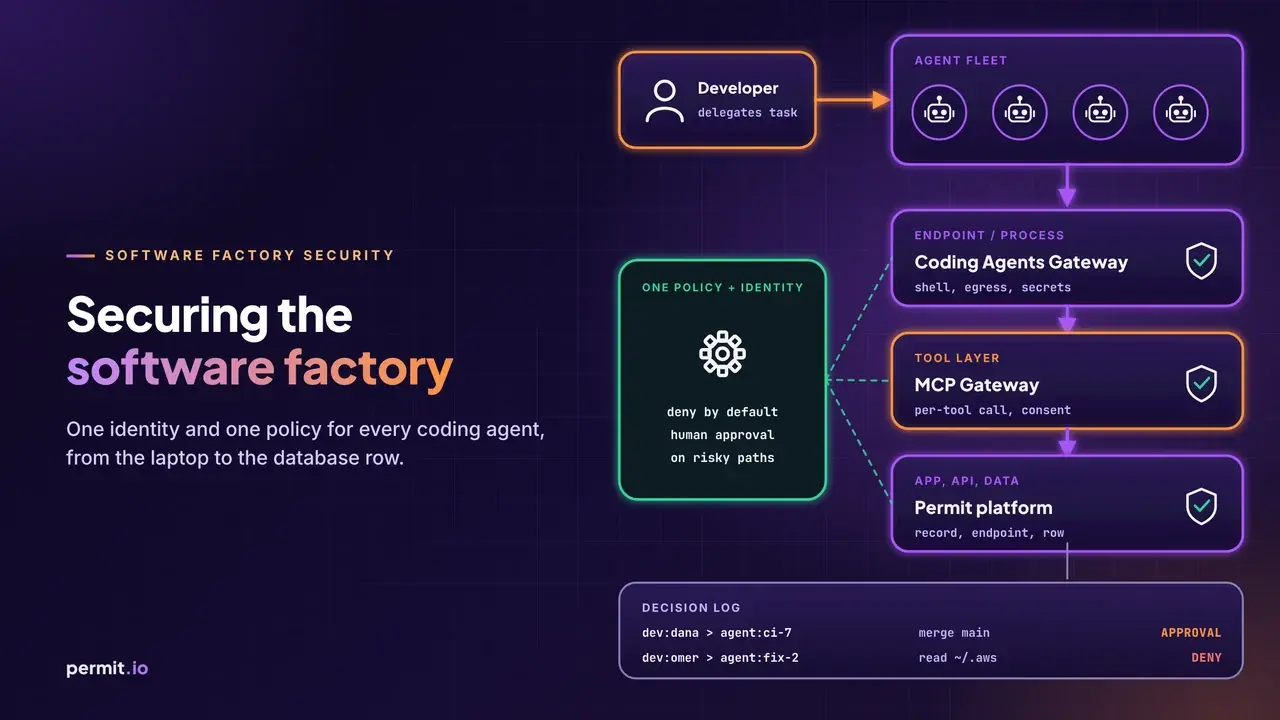
Full disclosure, we build a piece of this. As shared in our docs, Permit MCP Gateway is a proxy between MCP clients and the MCP servers they connect to. You point the MCP client at the gateway URL instead of the MCP server URL, with no server change and no SDK. For each tool call, the gateway authenticates the human behind the agent, checks the call against policy in Permit.io, confirms the human consented to the agent's access level, and logs the decision with the human, the agent, the tool, the MCP server, the time, and the allow or deny result. Access is deny by default, tools are classified by risk (read, write, or destructive), admins set the maximum trust level per user, and upstream OAuth tokens stay with the gateway.
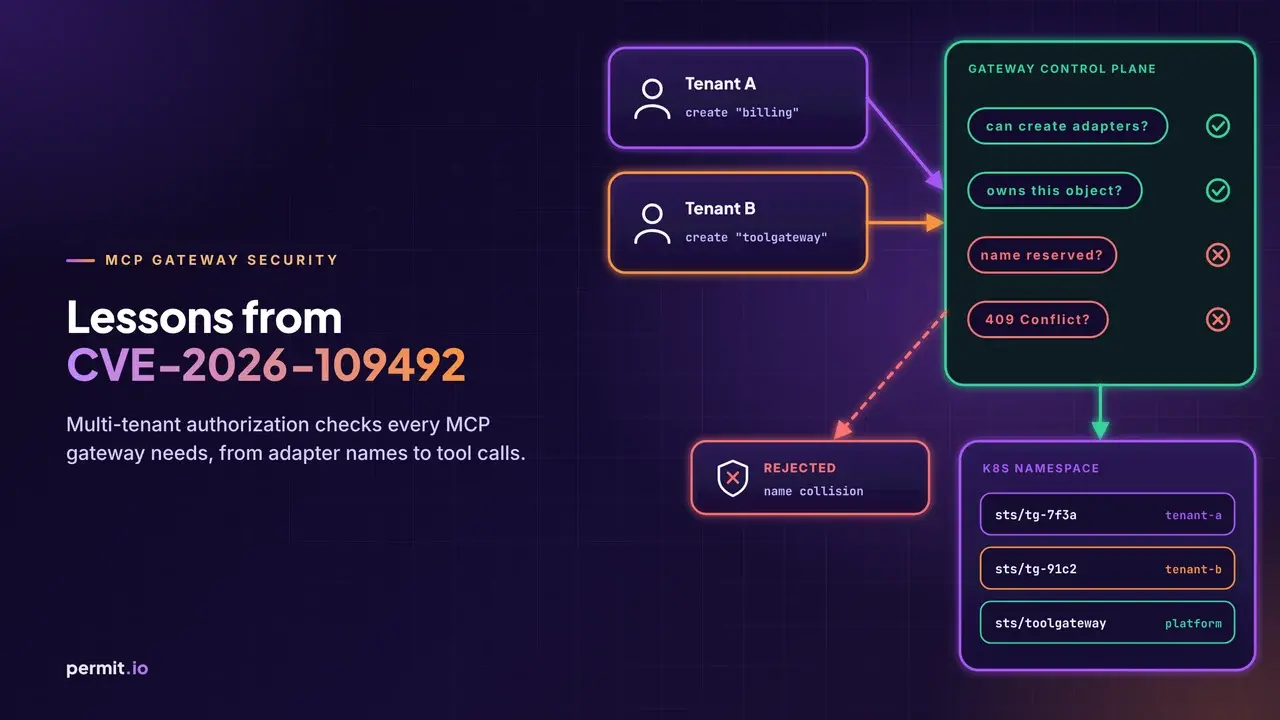
That helps with the policy decision and the audit evidence in Test 6, from the gateway side. It doesn't replace audience validation in your own server, and it doesn't make the upstream identity least privilege; Test 7 is still yours. A gateway is also an application with its own attack surface, which we looked at in MCP Gateway Security: Lessons From Two Gateway CVEs, so you still run all seven.
The short version
Your agent will write MCP auth that looks right. The spec makes authorization optional, so "it works" and "it's protected" are different claims. Run the seven tests, keep the evidence on the server side, and label what you executed versus what you expect. Then point the agent at the failures and let it fix its own homework.
If you run these against your setup and something here is wrong or missing, tell me. Questions, comments, insults, whatever comes to mind.